
UZ: Bank Cards - Payments
This page describes how to integrate payment for Uzbekistan bank Cards
"paymentMethodName": "BankCardUZ"
Payment Method Features
| Payment Method | HUMO | UZCARD |
|---|---|---|
| Country | Uzbekistan | Uzbekistan |
| Processing Currencies | UZS | UZS |
| Payments | Yes | Yes |
| -- Min per transaction amount | 500 UZS | 500 UZS |
| -- Max per transaction amount | 999,999,999 UZS | 999,999,999 UZS |
| -- Authentication | SMS | SMS |
| Disbursements | No | No |
| Refunds | Full & Partial | Full & Partial |
| Chargebacks | No | No |
Overview of the Possible Payment Scenarios:
Our API will provide you with all the necessary information to execute on of the following scenarios:
| Name | Steps |
|---|---|
| CHALLENGE FLOW (CF) |
|
| FRICTIONLESS FLOW (FF) |
|
Two-Step Payment (with 3DS) & Refund Workflow
You can read more about how to integrate 3Dsv1 workflow here
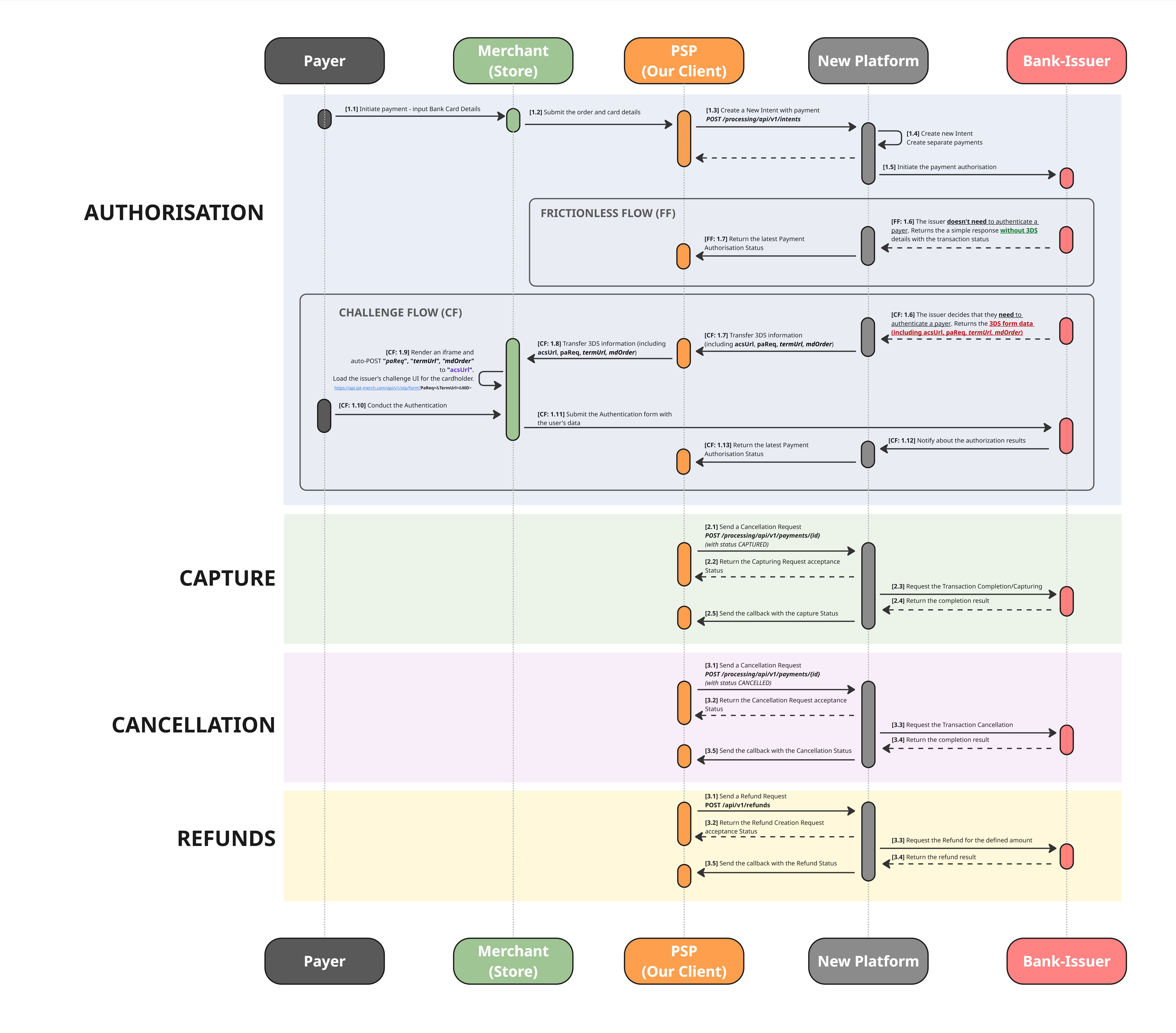
High-resolution image is available on the link: (Two_Step_Payment_with_3Ds__Refund_Workflow.jpg
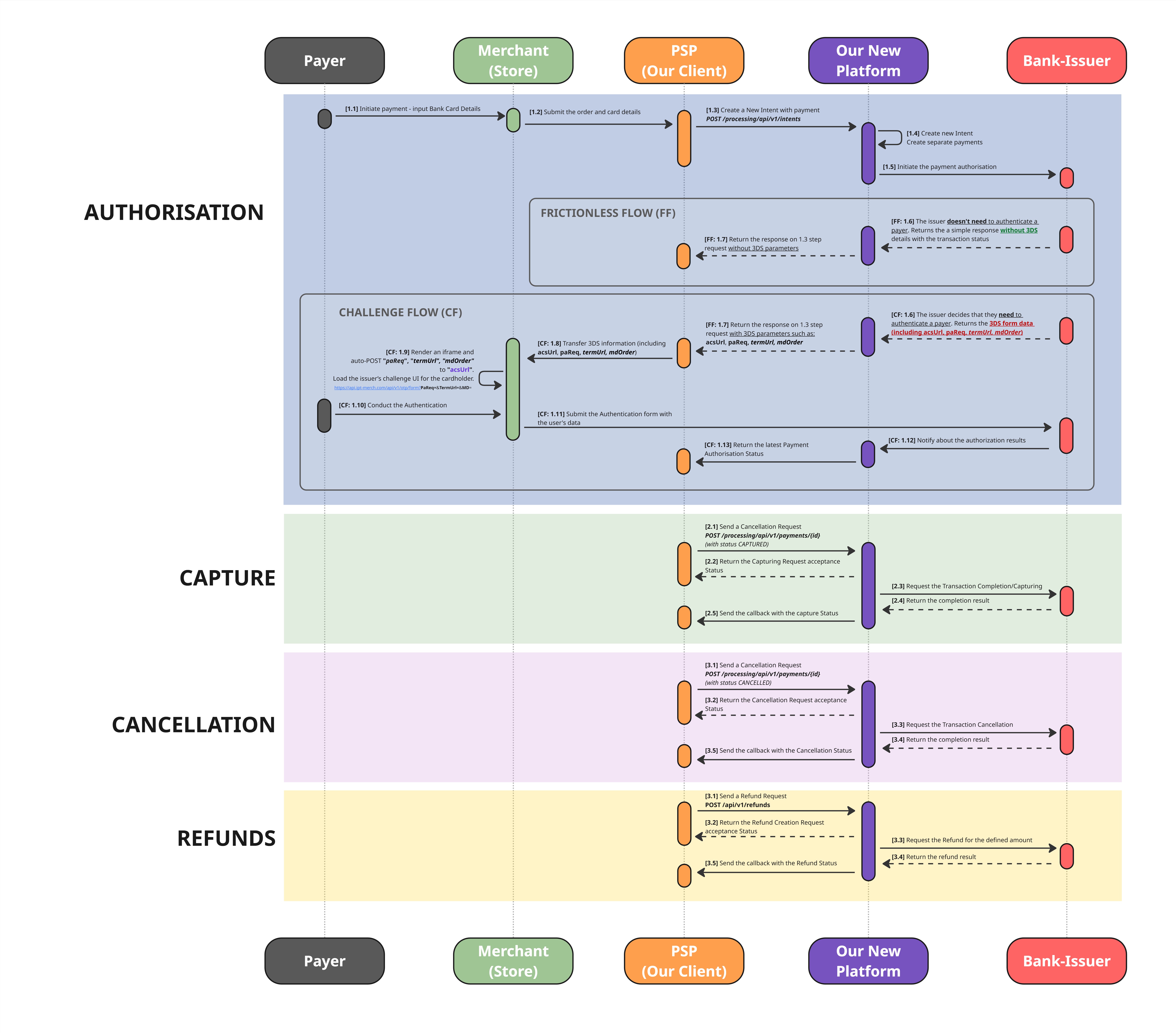
[Step 1.3] You need to create a new intent
- Use the following API method to create an intent:
*POST /processing/api/v1/intents*_. - When creating the intent, complete the
Paymentobject. - Most fields are common across all payment methods and are thoroughly described in the API Reference section.
- The
incomingDetails- object with method-specific parameters ( please make sure you provided them correctly):-
returnUrl -
viewType -
number -
holderName -
cvv -
expiryMonth -
expiryYear
-
- Ensure these all the required fields are completed accurately so that we can process your request correctly.
Request Example
{
  "clientReferenceId": "123456789",
  "payments": [
    {
      "paymentInstrument": {
        "paymentMethodName": "BankCardUZ",
        "incomingDetails": {
          "viewType": "web_view",
          "number": "4111111111111111",
          "holderName": "Will Rush",
          "expiryMonth": 12,
          "expiryYear": 2035,
          "returnUrl": "returnUrl"
        }
      },
      "submittedAmount": {
        "value": 100,
        "currency": "UZS"
      },
      "authCurrencyCode": "UZS"
    }
  ]
}
Request fields description
| Field | Required | Type | Description | Example |
|---|---|---|---|---|
| clientReferenceId | Required | String | The client/merchant intent reference. Aka, Transaction Reference | 1234 |
| payments | Required | Array of objects | -- |
Object "payment" fields description:
| Field | Required | Type | Description | Example |
|---|---|---|---|---|
| paymentInstrument | Required | Object | The receiver payment instrument | n/a |
| submittedAmount | Required | Object | n/a | |
| authCurrencyCode | Required | String | The currency the transaction will be processed. Always UZS for this method | UZS |
Object "payments[].paymentInstrument" fields description:
| Field | Required | Type | Description | Example |
|---|---|---|---|---|
| paymentMethodName | Required | String | Payment method name | BankCardUZ |
| incomingDetails | Required | Object | Additional data related to payment method | n/a |
Object "payments[].paymentInstrument.incomingDetails" fields description:
| Field | Required | Type | Description | Example |
|---|---|---|---|---|
| viewType | Required | String | The method of displaying the payment page during the online payment process. Possible values: web_view, iframe | web_view |
| number | Required | String | Primary Account Number (PAN), typically 16 digits (allow 12-19) | 4111111111111111 |
| cvv | Optional | String | Card verification code – 3 digits | 123 |
| holderName | Required | String | Cardholder name in Latin | Will Rush |
| expiryMonth | Required | String | Two-digit month 01–12 | 12 |
| expiryYear | Required | String | Format: YYYY | 2035 |
| returnUrl | Required | String | URL for redirecting after the payment |
Object "payments[].submittedAmount" fields description:
| Field | Required | Type | Description | Example |
|---|---|---|---|---|
| value | Required | Number | Transaction amount | 100.40 |
| currency | Required | String | The original currency of the transaction. Can vary, will be converted into auth currency during the processing | USD |
[Step FF 1.7] Challenge is not required: You will receive the latest Payment Authorisation Status
- The issuing bank analysing the card details decides whether to verify the payer’s identity. Based on this decision or not:
- Frictionless flow - The issuer considers the risk low and processes the transaction without further user interaction.
- If the Frictionless flow is used, the transaction will be authorised or declined immediately.
- You will receive this information through a webhook. Example are provided below:
{
    "transactionType": "PAYMENT",
    "transactionId": "111122223333444455",
    "status": "ACCEPTED"
}
[Step CF 1.7] Challenge is required: You will receive 3DSv1 details
- You will receive this information through sync response.
- In the response, you will receive an additional object
additionalData.details. It contains the following fields:acsUrl- AcsUrl for 3DS authentication; if present, the 3DS form should be displayed.termUrl- Terminal URLmdOrder- Order identifier used to open the 3DS form
Response Example
{
    "intentId": "12345678912345678",
    "payments": [
        {
            "id": "12345678912345678",
            "submittedAmount": {
                "value": 500.00,
                "currency": "UZS"
            },
            "authAmount": {
                "value": 500.00,
                "currency": "UZS"
            },
            "paymentInstrument": {
                "id": "",
                "storedDetails": {
                    "number": "*************",
                    "holderName": "Hello World",
                    "expiryMonth": 11,
                    "expiryYear": 2027,
                    "viewType": "web_view",
                    "returnUrl": "https://returnUrl"
                }
            },
            "status": "AUTHORIZATION_REQUESTED",
            "additionalData": {
                "paymentId": 12345678912345678,
                "status": "AUTHORIZATION_REQUESTED",
                "details": {
                    "paReq": null,
                    "acsUrl": "acsUrl",
                    "termUrl": "termUrl",
                    "mdOrder": "mdOrder"
                }
            }
        }
    ],
    "disbursements": [],
    "clientReferenceIntentId": "api",
    "paymentCreationErrors": [],
    "disbursementCreationErrors": [],
    "intentStatus": "IN_PROGRESS"
}
[Step 1.9] Render an iframe and auto-POST "termUrl", "mdOrder" to "acsUrl".
- You need to render an iframe and auto-POST
"termUrl","mdOrder"to"acsUrl". Load the issuer’s challenge UI for the cardholder
[Step 1.13] Challenge complete: You will receive the latest Payment Authorisation Status
Response Example
{
    "transactionType": "PAYMENT",
    "transactionId": "111122223333444455",
    "status": "ACCEPTED"
}
One-Step Payment (with 3DS) & Refund Workflow
Our platform supports auto-capturing, which means you do not need to send a separate capture or cancellation request.
Please note that while auto-capturing reduces the number of actions required on your side, it does not allow you to cancel a transaction once it has been captured. In such cases, you would need to initiate a refund, which may incur additional charges.
Kindly let us know if you would like auto-capturing to be enabled for your account.
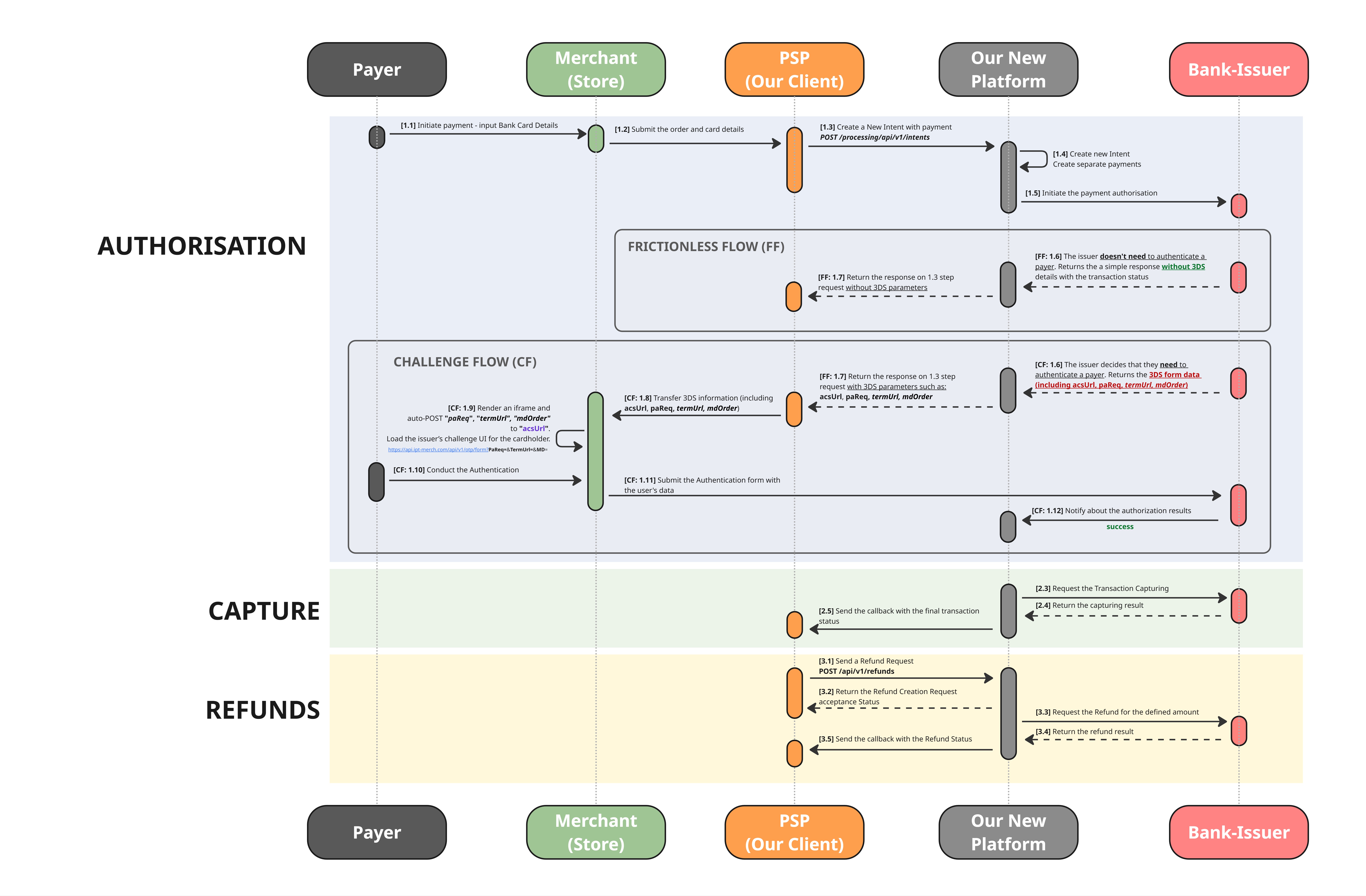
High-resolution image is available on the link
PAYMENTS TESTING
Bank Card UZ has many cases to test. The detailed description is available on the dedicated page
Updated about 1 month ago