
FX: Get Exchange Rates
Overview
The Foreign Exchange (FX) module gives you programmatic access to currency conversion rates within the Carusell platform. Use it to retrieve the current exchange rate for a supported currency pair before initiating a payment or disbursement.
Show payers an estimated conversion rate before they confirm a transaction
Fetch rates for quote generation, internal pricing logic, or reporting
Retrieve the rate closest to a specific point in time for auditing
Indicative Rate OnlyThe rate returned by this endpoint is informational only — it is not locked, reserved, or guaranteed.
The exchange rate used for actual settlement is fixed automatically at the moment a payment or disbursement is created — not by calling this endpoint.
How It Works
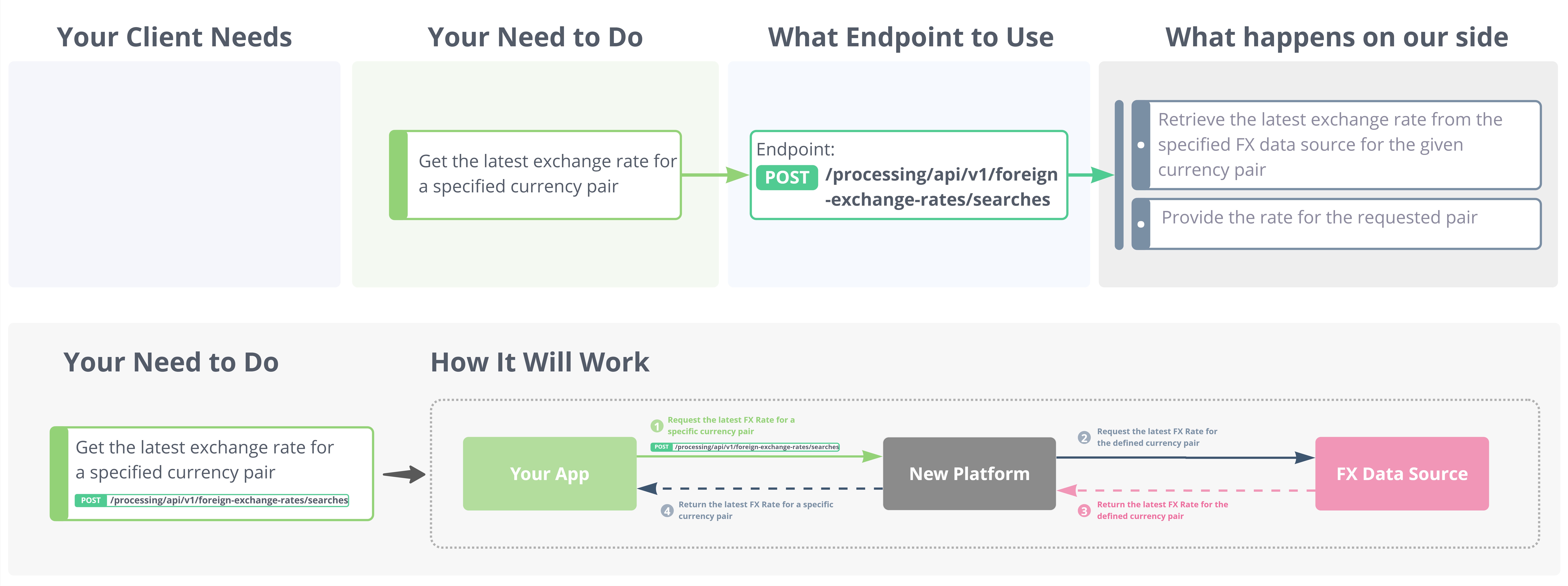
| Step | Description |
|---|---|
| 1 | You send a POST request with the currency pair, FX provider, and a target timestamp |
| 2 | The platform looks up the rate closest to the timestamp you provided |
| 3 | If you include an amount, the converted value is calculated and returned |
| 4 | The rate, currency pair, and timestamps are returned in the response |
| 5 | When you later create a payment or disbursement, the rate is locked at that moment — not by this call |
Markups & Settlement Account
Every FX rate request is tied to a Settlement Account (SA) via the
settlement-account-idheader. The rate returned by the endpoint already includes any markup configured on that Settlement Account.
What is a Markup?
A markup is an additional margin applied on top of the raw market rate from the FX data source. It is defined in your contract and configured by the Carusell team on your Settlement Account in the back-office admin application.
| Scenario | What you receive |
|---|---|
| Markup is configured (e.g. 1%) | Returned rate = Market Rate ± 1% markup. No further calculation needed on your side. |
| Markup is 0% (or not configured) | Returned rate = raw market rate from the FX data source. |
Where to find your Settlement Account ID
Your
settlement-account-idis provided by the Carusell integration team during onboarding. You can also find it in your Client Portal.Different Settlement Accounts may have different markups configured — make sure you use the correct one for the transaction you're preparing.
Endpoint
| Method & Path | Description |
|---|---|
| POST /processing/api/v1/foreign-exchange-rates/searches | Retrieve the current FX rate for a given currency pair |
Headers
| Header | Type | Required | Description |
|---|---|---|---|
Authorization | String | Required | Bearer token obtained from the authentication endpoint |
settlement-account-id | String | Required | Your Settlement Account ID. Determines which markup is applied to the returned rate. |
FX Providers
The fxProvider field defines the data source used to fetch the rate. Use the table below to choose the right one for your integration.
| Value | Status | Description |
|---|---|---|
XECOM | ✅ In use | Live market rate from the connected external data source. Default choice for most integrations. |
MANUAL | ✅ In use (specific cases) | A fixed rate manually configured by the Carusell team for your account, valid for an agreed period (e.g. a day, week, or month). Used when a fixed rate is agreed in your contract. Requires prior arrangement. |
CLIENT | ✅ In use (specific cases) | For merchants who source rates from their own system and submit them to Carusell. The platform validates the rate upon submission. Requires prior arrangement with your integration manager. |
STATIC | ❌ Not in use | — |
TEST_FX_PROVIDER | ❌ Not in use | — |
If you're unsure which provider to use, use
XECOM. TheMANUALandCLIENTproviders require prior configuration with the Carusell team.
Request / Response Description
Request Sample
{
  "submittedCurrency": "USD",
  "submittedAmount": 10000,
  "authCurrency": "AUD",
  "fxProvider": "XECOM",
  "conversionTimestamp": "2025-01-01T00:00:00Z"
}
Request Parameters
| Parameter | Type | Required | Description |
|---|---|---|---|
submittedCurrency | String | Required | Source currency code in ISO 4217 format. Example: USD |
authCurrency | String | Required | Target currency code in ISO 4217 format. Example: AUD |
fxProvider | String | Required | FX data source to use. See the FX Providers section above. Example: XECOM |
conversionTimestamp | String (ISO 8601) | Required | Target point in time for rate lookup. The platform returns the rate closest to this timestamp. Example: 2025-01-01T00:00:00Z |
submittedAmount | Number | Conditional | Amount in the source currency. If provided, the platform calculates authAmount.Example: 10000 |
authAmount | Number | Conditional | Amount in the target currency. If provided, the platform calculates submittedAmount.Example: 14769.41 |
Amount Fields BehaviourProvide either
submittedAmountorauthAmount— never both.
- If you provide
submittedAmount→ the platform calculatesauthAmount- If you provide
authAmount→ the platform calculatessubmittedAmount- If you provide neither → only the rate is returned, with no amount conversion
Response Sample
{
  "submittedCurrency": "USD",
  "submittedAmount": 10000,
  "authCurrency": "AUD",
  "authAmount": 14769.41,
  "currencyPair": "USDAUD",
  "rate": 1.476941,
  "createdAt": "2025-01-01T00:00:00Z"
}
Response Parameters
| Parameter | Type | Required | Description |
|---|---|---|---|
submittedCurrency | String | Required | Source currency code (returned from the request). |
submittedAmount | Number | Required | Amount in the source currency. Either returned from the request or calculated from authAmount. |
authCurrency | String | Required | Target currency code (returned from the request). |
authAmount | Number | Required | Amount in the target currency. Either returned from the request or calculated from submittedAmount. |
currencyPair | String | Required | The currency pair the rate applies to. Example: USDAUD |
rate | Number | Required | The exchange rate from source to target currency. Includes any markup configured on your Settlement Account. Example: 1.476941 |
createdAt | String (ISO 8601) | Required | Timestamp of when the rate was retrieved. Example: 2025-01-01T00:00:00Z |
The
ratefield already reflects any markup configured on your Settlement Account — no additional calculation is required on your side.
Updated 5 months ago