
🇷🇺 RU: SBP Disbursement
"paymentMethodName": "SBP"
Payment Method Features
| Feature | SBP |
|---|---|
| Country | Russia |
| "paymentMethodName" in API | SBP |
| Processing Currencies | RUB |
| Payments | No |
| Disbursements | Yes |
| -- Min per transaction amount | 1 RUB |
| -- Max per transaction amount | Vary, depends on your contract |
| Refunds | No |
| Chargebacks | No |
PAM - is a Personal Authentication Message provided by the Faster Payments System (SBP) in response to a lookup request using the recipient’s identifier (typically a phone number)
Possible Disbursement Scenarios:
Our API will provide you with all the necessary information to execute one of the following scenario:
Step | Mandatory | Description |
|---|---|---|
1 | Yes |
|
2 | Optional |
You can skip this step if you are confident in the request data. |
3 | Yes |
|
Workflow: SBP Disbursements
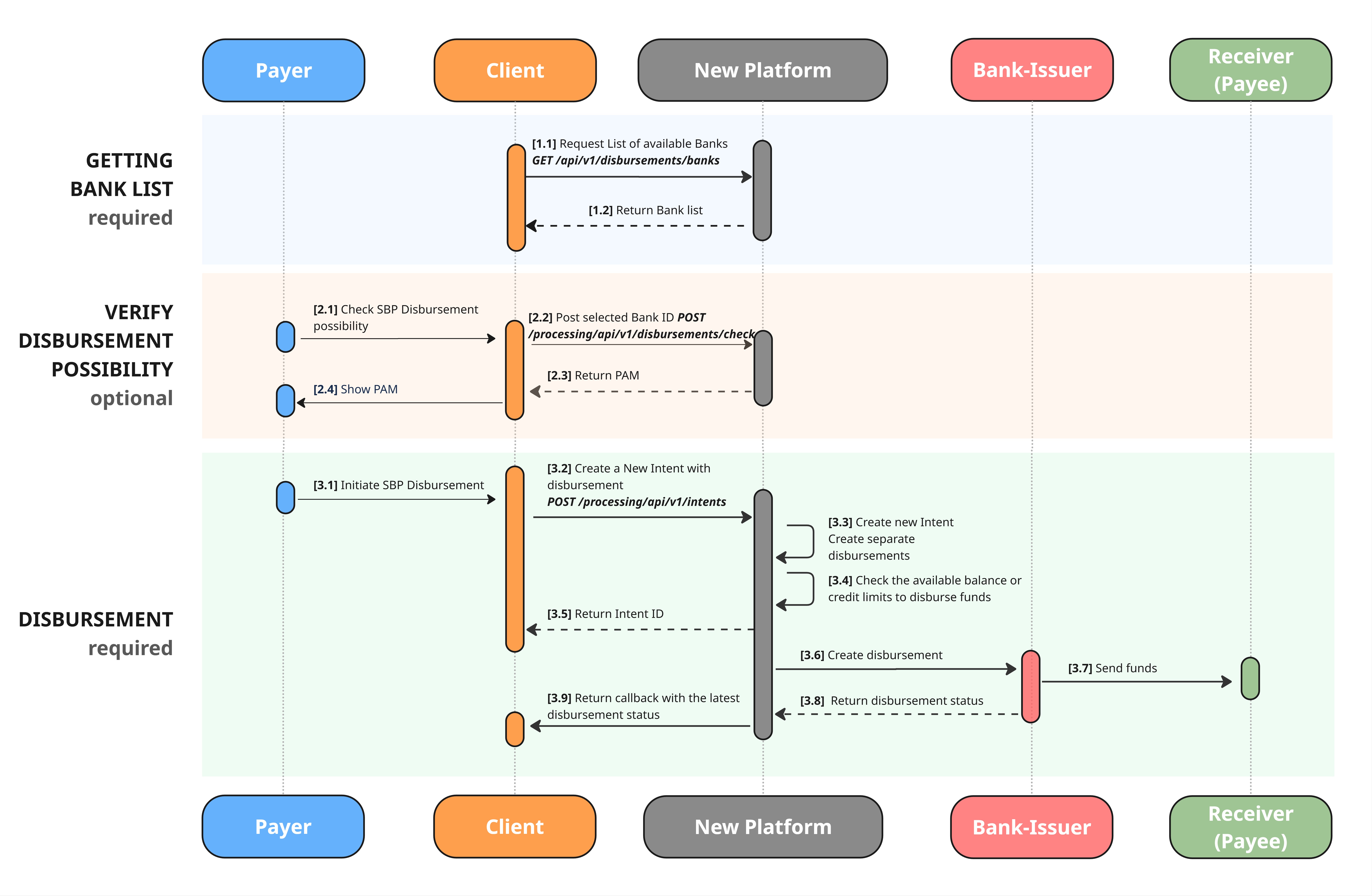
Download in high resolution
[Step 1.1] You need to requests the list of available Banks.
Before checking or creating an intent to make a disbursement, you need to know which bank code to use.
To retrieve the bank code, send a List of Available Banks request using: GET /processing/api/v1/disbursements/banks/{paymentMethod}
[Step 2.1] You verify the possibility of disbursement.
You can skip this step if you are confident in the request data.
- Use the following API method to check disbursement possibility:
POST /processing/api/v1/disbursements/check. - Most fields are common across all payment methods and are thoroughly described in the API Reference section.
- Method-specific parameters ( please make sure you provided them correctly):
payee.phonepayeePaymentInstrument.incomingDetails.bankCode
- Ensure these all the required fields are completed accurately so that we can process your request correctly.
Request Example
{
	"payeePaymentInstrument": {
		"paymentMethodName": "SBP",
		 "incomingDetails": {
                    "accountNumber": "+71234567890",
                    "bankCode": "100000000001"
                }
	},
	"submittedAmount": {
		"currency": "RUB"
	},
	"authAmount": {
		"value": 200.00,
		"currency": "RUB"
	}
}
Request fields description:
payeePaymentInstrument
payeePaymentInstrument| Field | Required | Type | Description | Example |
|---|---|---|---|---|
| paymentMethodName | Yes | String | Payment method name | SBP |
| incomingDetails | Yes | Object | Additional data related to payment method | n/a |
payeePaymentInstrument.incomingDetails for SBP Disbursement
payeePaymentInstrument.incomingDetails for SBP Disbursement| Field | Required | Type | Description | Example |
|---|---|---|---|---|
| bankCode | Yes | String | The code of the bank participating in SBP transfers | 100000000001 |
| accountNumber | Yes | String | Recipient's phone number | +71234567890 |
disbursements[].submittedAmount and disbursements[].authAmount
disbursements[].submittedAmount and disbursements[].authAmountHaving two objects that looks similar might be confusing, however we need both objects to process your request correctly when the FX is involved.
Please follow the instruction on the dedicated page Amount Fields: submittedAmount and authAmount
[Step 2.4] Return the PAM in response
You will receive information on whether the disbursement is possible, along with the additionalData.pam.
The response may take up to 30 seconds due to the acquirer’s processing logic.
For verify the possibility of disbursement please show the
pam(recipient’s identifier) to the payer. In this case the payer need to review and confirm thepambefore proceeding to the next step.
{
    "isDisbursementAllowed": true,
    "paymentAmount": {
        "value": 200,
        "currency": "RUB"
    },
    "receivedAmountCurrencyCode": "RUB",
    "clientOriginalRequest": {
        "payeePaymentInstrument": {
            "paymentMethodName": "SBP",
            "incomingDetails": {
                    "accountNumber": "+71234567890",
                    "bankCode": "100000000001"
            }
        },
        "submittedAmount": {
            "currency": "RUB"
        },
        "authAmount": {
            "value": 200,
            "currency": "RUB"
        }
    },
    "additionalData": {
        "pam": "Петр Петрович П"
    },
    "errorCode": "CODE_CP0000",
    "errorMessage": "string"
}
[Step 3.1] You need to create a new intent
- Use the following API method to create an intent:
POST /processing/api/v1/intents. - When creating the intent, complete the
Disbursementobject. - Method-specific parameters ( please make sure you provided them correctly):
payeePaymentInstrument.incomingDetails.accountNumberpayeePaymentInstrument.incomingDetails.bankCode
- Most fields are common across all payment methods and are thoroughly described in the API Reference section.
- Ensure these all the required fields are completed accurately so that we can process your request correctly.
- You can skip directly to this step if you are confident in the request data.
Request Example
{
    "clientReferenceId": "202510202",
    "disbursements": [
        {
            "payeePaymentInstrument": {
                "paymentMethodName": "SBP",
                "incomingDetails": {
                    "accountNumber": "+71234567890",
                    "bankCode": "100000000001"
                }
            },
            "submittedAmount": {
                "currency": "RUB"
            },
            "authAmount": {
                "value": 200,
                "currency": "RUB"
            }
        }
    ]
}
Request fields description:
payeePaymentInstrument
payeePaymentInstrument| Field | Required | Type | Description | Example |
|---|---|---|---|---|
| paymentMethodName | Yes | String | Payment method name | SBP |
| incomingDetails | Yes | Object | Additional data related to payment method | n/a |
payeePaymentInstrument.incomingDetails for SBP Disbursement
payeePaymentInstrument.incomingDetails for SBP Disbursement| Field | Required | Type | Description | Example |
|---|---|---|---|---|
| bankCode | Yes | String | The code of the bank participating in SBP transfers | 100000000001 |
| accountNumber | Yes | String | Recipient's phone number | +71234567890 |
[Step 3.5] Return the status in response
- In the response, you will receive an disbursement id and status
Response Example
{
    "intentId": "24148546870213835",
    "payments": [],
    "disbursements": [
        {
            "id": "241485668832161722",
            "submittedAmount": {
                "currency": "RUB"
            },
            "authAmount": {
                "value": 200,
                "currency": "RUB"
            },
            "payeePaymentInstrument": {
                "id": "3525967789943272833",
                "storedDetails": {
                    "accountNumber": "+71234567890",
                    "bankCode": "100000000001"
                }
            },
            "createdAt": 1761558494.4515812,
            "status": "ACCEPTED"
        }
    ],
    "clientReferenceIntentId": "202510202",
    "intentStatus": "CREATED"
}
[3.9] Receive the callback with the transaction status
More about Disbursement Callbacks on the dedicated page
- After the transaction was processed and reached its final status (PAID_OUT or DECLINED)
- The Platform will notify you about the latest status change via the callback
SIMPLE CALLBACK WITH TRANSACTION STATUS
{
    "transactionType": "DISBURSEMENT",
    "transactionId": "111122223333444455",
    "status": "ACCEPTED"
}
Test Data
Our system allows you to simulate different disbursement statuses in the sandbox environment. To simulate specific scenarios and receive different results, use in POST /processing/api/v1/disbursements/check the additionalData parameter and in POST /processing/api/v1/intents the intent.description parameter.
SBP Check Disbursement Possibility Test flow
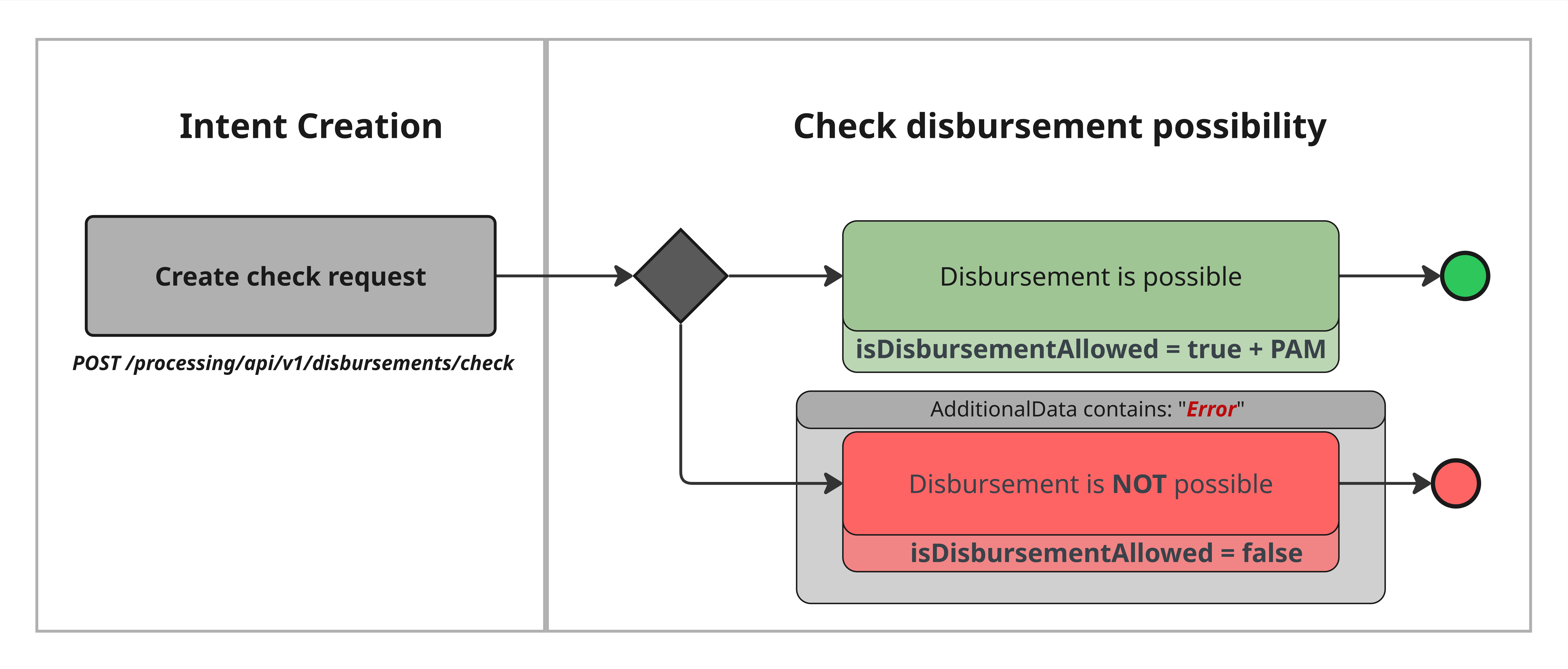
High-resolution image is available here
| Case | additionalData | response contain |
|---|---|---|
| Disbursement is possible | -- | isDisbursementAllowed = true and additionalData.pam |
| Disbursement is NOT possible | Error | isDisbursementAllowed = false |
Test scenarios
Case | Steps |
|---|---|
Disbursement is possible |
|
Disbursement is NOT possible |
|
Request Example for Case "Disbursement is NOT possible"
{
	 "payeePaymentInstrument": {
                "paymentMethodName": "SBP",
                "incomingDetails": {
                    "accountNumber": "+71234567890",
                    "bankCode": "100000000001"
                }
            },
	"submittedAmount": {
		"currency": "RUB"
	},
	"authAmount": {
		"value": 200.00,
		"currency": "RUB"
  },
  "additionalData":"Error"
}
SBP Disbursement Test flow
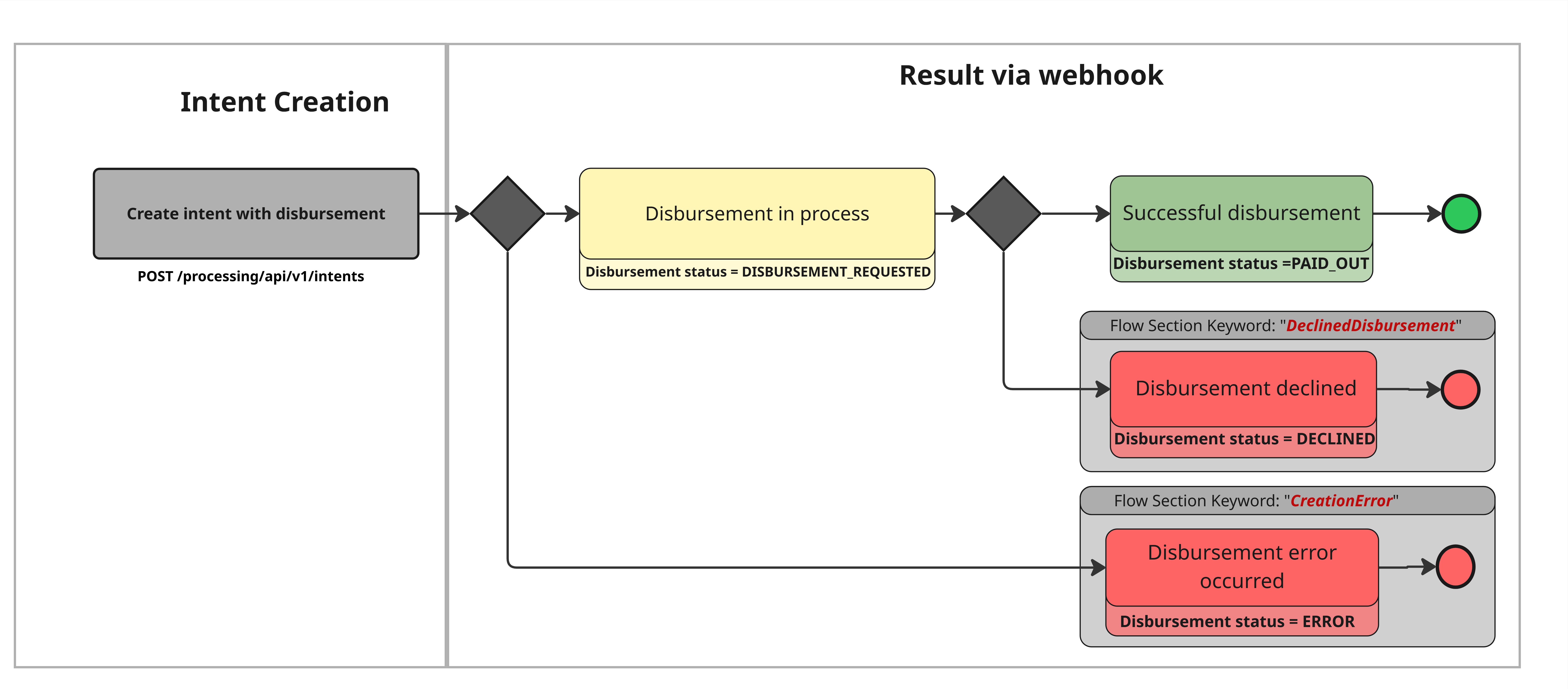
High-resolution image is available here
| Case | intent.description | Final disbursement status |
|---|---|---|
| Successful disbursement | -- | PAID_OUT |
| Disbursement declined | DeclinedDisbursement | DECLINED |
| Disbursement error occurred | CreationError | ERROR |
Test scenarios
Case | Steps |
|---|---|
Successful disbursement |
|
Disbursement declined |
|
Disbursement error occurred |
|
Updated about 2 months ago