
Payment Instrument Tokenization (Checkout)
Let your customers save a card during a hosted-checkout payment and reuse it in one click next time. The full card number is stored securely on our side (in the vault) and is never exposed to your systems or the browser.
How it works
In the hosted Checkout flow you make one API call — creating the payment intent. Everything else happens on the hosted form:
| Step | Description |
|---|---|
| 1 | You create a PaymentIntent and receive a checkout link. |
| 2 | You redirect the shopper to that link. |
| 3 | On the form the shopper saves a card, reuses a saved one, or removes one — no extra API calls from your side. |
| 4 | You receive the result on your webhook. |
The shopper experience
Saving, selecting and removing cards all happen on the hosted checkout. Below is what the shopper sees and can do.
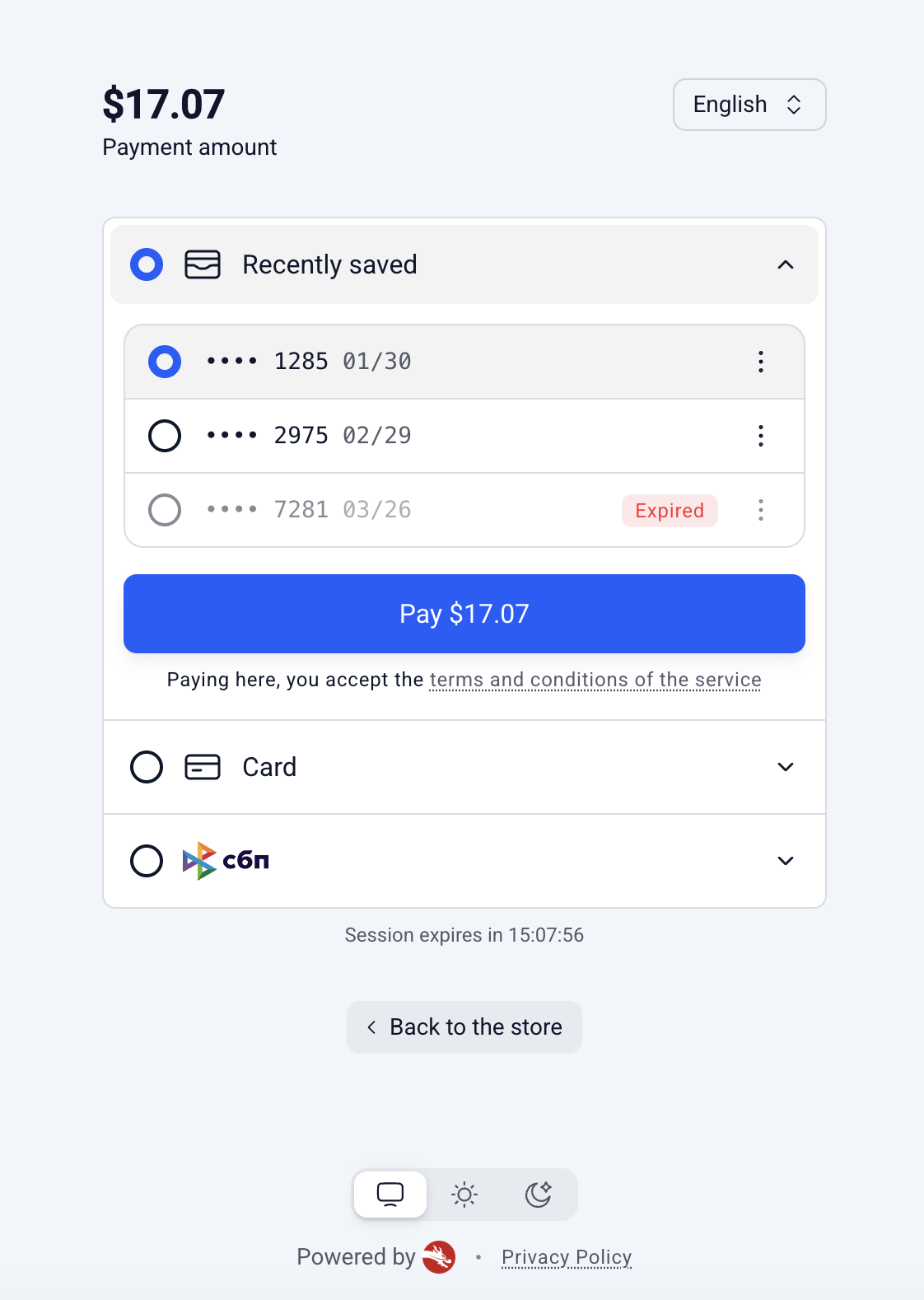
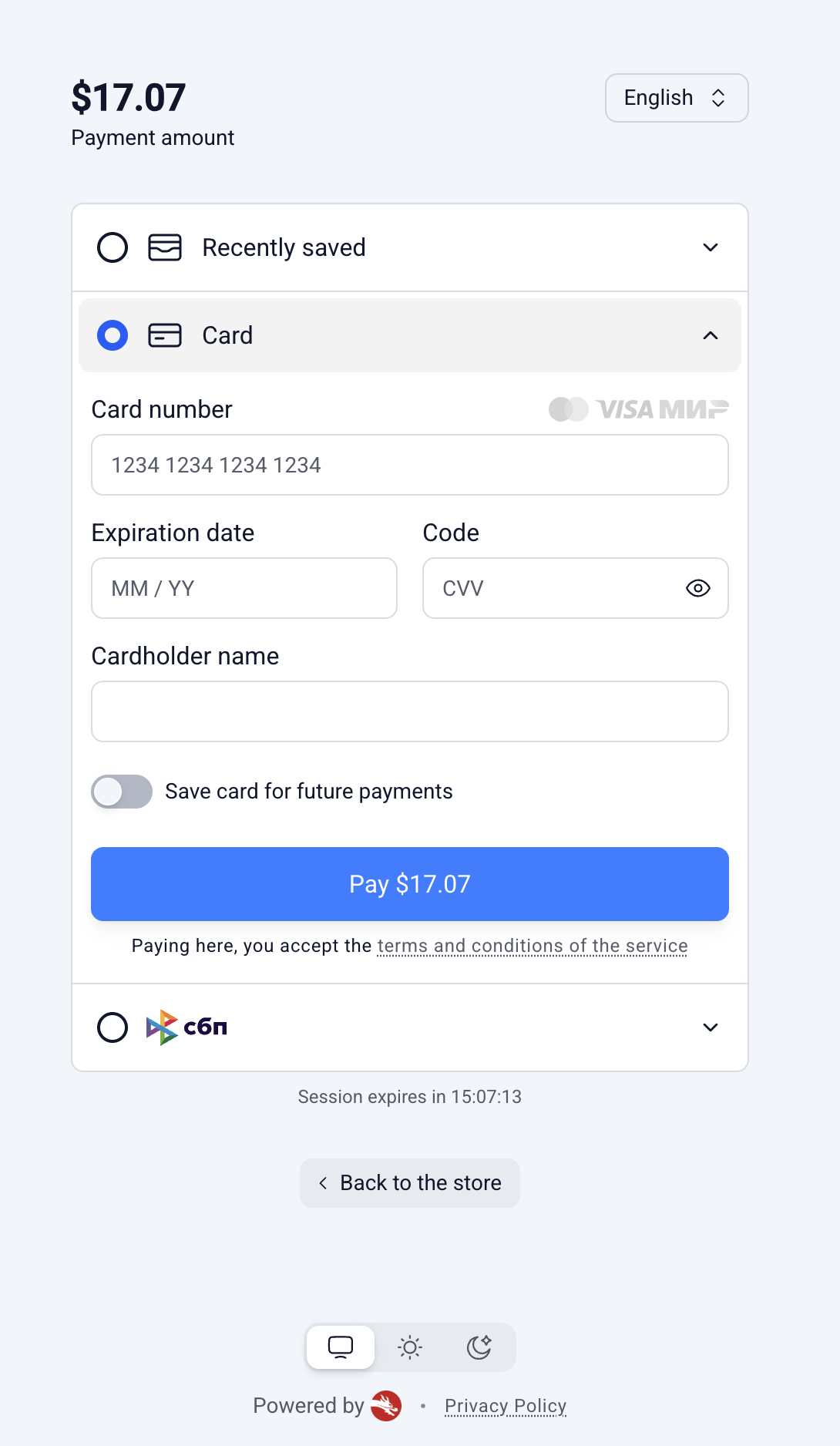
List of Scenarios
| Scenario | Description |
|---|---|
| Saving a new card |
|
| Viewing saved cards |
|
| Paying with a saved card |
|
| Removing a saved card |
|
Consent
- A card is stored only with the shopper's explicit consent, given by ticking the save option on the form.
- Without that consent, no card details are retained.
Limit on saved cards
- By default, a shopper can save up to 5 cards per payment method.
- Your integration manager can adjust this limit.
- Once the limit is reached, the shopper must remove an existing card before a new one can be saved.
- Reaching the limit never blocks payment: the shopper can still pay with a new card — it is simply charged without being saved.
Unavailable cards
- A saved card can become unusable if the issuing bank reports it as invalid — for example, the card was lost, blocked, or has expired.
- Such a card is not removed automatically.
- It stays visible in the shopper's list, clearly marked as unavailable: the shopper cannot pay with it, but can delete it — which also frees up a slot for a new card.
Enabling saved cards
You are fully responsible for passing the correctmerchantPayerReference.Cards are shown to whoever the intent says the payer is. If you send a value that belongs to a different user (a wrong or mixed-up id), that user's saved cards will be exposed to the current shopper. Make sure the reference always matches the authenticated user in your system.
Two things are required for a shopper to see and reuse their saved cards:
1. Feature enabled on the form template.
- Card saving is configured per merchant and is off by default.
- Ask your integration manager to enable it and to set the limit of saved cards per payment method.
2. Identify the shopper in the intent.
- Saved cards are tied to
(your account + payer.merchantPayerReference). - Pass a stable
merchantPayerReference(the shopper's id in your system) when creating the intent. - Use the same value on future intents and the shopper's saved cards appear automatically.
- If you omit it, nothing can be saved or reused.
Without
merchantPayerReference, the "Save card" option still shows and the payment goes through — but the tick is silently ignored and nothing is stored. Always send a stable reference to actually save cards.
Create the intent
Full list of parametersThe full list of parameters is available on the page: "Card" Payment Method
POST https://sandbox.carusell.world/processing/api/v1/intentscurl --request POST \
--url 'https://sandbox.carusell.world/processing/api/v1/intents' \
--header 'content-type: application/json' \
--header 'X-API-Key: <token>' \
--data '{
"clientReferenceId": "order_12345",
"useCheckoutForm": true,
"paymentIntent": {
"submittedAmount": { "value": 17.07, "currency": "USD" },
"description": "Order #12345",
"webhookUrl": "https://merchant.com/webhook",
"payer": {
"merchantPayerReference": "CUST_12345",
"email": "[email protected]"
},
"formDetails": {
"template": "checkout-light",
"displayedPaymentMethods": ["CARD", "SBP"],
"backToStoreRedirectUrl": "https://merchant.com/checkout"
}
}
}'Key fields
| Field | Required | Purpose |
|---|---|---|
useCheckoutForm | yes | Must be true for hosted Checkout. |
paymentIntent.payer.merchantPayerReference | for tokenization | Stable shopper id in your system — the key that links saved cards to the shopper. |
Response — the intent contains the checkout session id and the hosted link to open:
{
  "intentId": "...",
  "paymentIntent": {
    "intentSessionId": "is_01JVM1PZ0J7B1Y9J6R3X2M8KQF",
    "additionalData": {
      "url": "https://checkout.carusell.world/is_01JVM1PZ0J7B1Y9J6R3X2M8KQF"
    }
  }
}
Redirect the shopper to paymentIntent.additionalData.url.
Webhook
Full list of parametersThe full list of parameters is available on the page: Webhooks: Example
When the payment finishes, we call your webhookUrl. The two fields relevant to card-on-file are isStoredCredential and last4, delivered alongside the standard payment fields.
Example of a successful card payment made with a saved card:
{
  ...
  "isStoredCredential": true,
  "last4": "4242",
  ...
}
Fields
| Field | Meaning |
|---|---|
isStoredCredential | true if the payment was made with a previously saved card. |
last4 | Last 4 digits of the card used. Returned on any card payment whenever we have the card data — both successful and declined — not only for saved cards. |
Note on what the webhook tells you: isStoredCredential signals only that the payment was made using a saved card. There is no separate "a new card was just saved" flag, and the card token (pi_) is not returned. If you need to know a card was newly stored, that state is not delivered via the webhook today.
Updated 3 months ago