
IN: UPI - Payments
"displayedPaymentMethods": "UPI
Payment Method Features
| Feature | Description |
|---|---|
| Country | India |
| Processing Currencies | INR - Indian Rupees |
| Payments | Yes |
| Disbursements | No |
| -- Min per transaction amount | 1 INR |
| -- Max per transaction amount | 100,000 INR |
| Refunds | Yes |
| Chargebacks | No |
Workflow: Payment & Refund
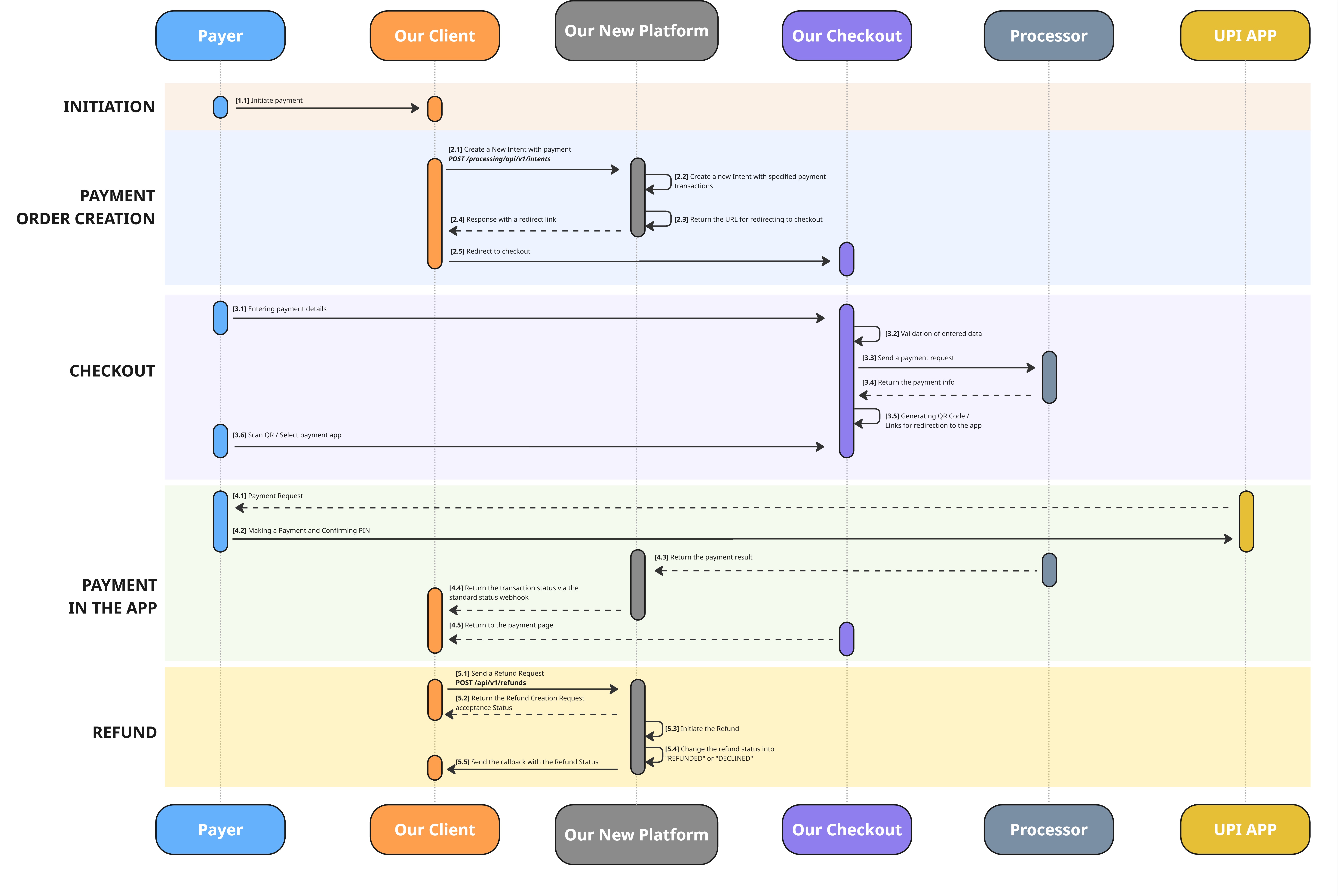
Download in high resolution
Possible Payment Scenarios:
Our API will provide you with all the necessary information to execute on of the following scenarios:
| Name | Steps |
|---|---|
| Displaying a QR Code in a Web Browser |
|
| Payment via Mobile Application |
|
List of used API Requests:
| Request | Endpoint | Description |
|---|---|---|
| Intent Creation | POST /processing/api/v1/intents |
|
Intent Creation Request/Response
Request specifics
- Endpoint:
POST /processing/api/v1/intents- Purpose: Creates an
Intentfor the selected payment method.- Structure: A unified request structure is used for all supported payment methods.
- For this method:
- The
paymentIntentobject is populatedpaymentIntentis populated withtrue- The
paymentIntent.formDetails.displayedPaymentMethodsarray contains the UPI- The following optional fields are recommended for populating:
paymentIntent.descriptionpaymentIntent.payer.firstnamepaymentIntent.payer.lastnamepaymentIntent.payer.taxIdentification
Request Description
{
  "clientReferenceId": "1234",
  "useCheckoutForm": true,
  "paymentIntent": {
    "formDetails": {
      "template": "string",
      "displayedPaymentMethods": ["UPI"],
      "backToStoreRedirectUrl": "string"
    },
    "submittedAmount": {
      "value": 100.05,
      "currency": "INR"
    },
    "description": "INTENT 1234",
    "webhookUrl": "webhookUrl",
    "payer": {
      "firstname": "Jake",
      "lastname": "Yellow",
      "taxIdentification": "AAAPZ1234C"
    },
    "payee": {}
  },
  "description": "INTENT 1234",
  "merchant": {
    "name": "Mustermann",
    "website": "website.io"
  }
}
Top-Level Request Parameters
| Parameter | Type | Required | Description |
|---|---|---|---|
clientReferenceId | String | Required | Order number in the merchant system. |
useCheckoutForm | Boolean | Conditional | Optional in general. Must be set to true when using the Checkout Form integration. |
paymentIntent | Object | Conditional | Optional in general. Must be provided when using the Checkout Form integration. |
description | String | Optional | Order description. Displayed if paymentIntent.description is not provided. |
merchant | Object | Optional | Merchant information. Required if the store name must be displayed on the checkout form. |
paymentIntent
| Parameter | Type | Required | Description |
|---|---|---|---|
formDetails | Object | Optional | Checkout parameters |
submittedAmount | Object | Required | Order amount and currency |
description | String | Optional | Order Description that can be displayed on the Checkout Form. |
webhookUrl | String | Required | URL to which we will send webhooks related to payments created within the Intent and their status changes |
payer | Object | Optional | Payer (consumer) details. May be used to pre-fill the checkout form and for compliance/risk purposes. |
payee | Object | Optional | Payee (recipient/beneficiary) details. Used for compliance and reporting purposes when applicable. |
formDetails
| Parameter | Type | Required | Description |
|---|---|---|---|
template | String | Optional | The name of the checkout template to be used. Multiple templates can be configured and selected for different use cases |
displayedPaymentMethods | Array of Strings | Optional | List of payment methods to be made available to the payer. If only one payment method is provided, no selection screen is shown and the payer is taken directly to that payment method |
backToStoreRedirectUrl | String | Optional | URL to which the payer is redirected if they leave the Checkout Form or after payment completion. Must start with "https://". |
submittedAmount
| Parameter | Type | Required | Description |
|---|---|---|---|
value | Number | Required | Submitted order amount. May differ from the authorised amount if FX conversion is applied. |
currency | String | Required | Submitted order currency. May differ from the authorised amount if FX conversion is applied. |
payer
| Parameter | Type | Required | Description |
|---|---|---|---|
firstname | String | Optional | Payer's first name. Example: Jake |
lastname | String | Optional | Payer's last name. Example: Yellow |
phone | String | Optional | Payer's phone number, including country code. Example: +62285128011 |
email | String | Optional | Payer's email address. Example: [email protected] |
countryIsoCode | String | Optional | Payer's country of residence in ISO 3166-1 alpha-2 format. Example: PH |
locale | String | Optional | The locale describing the preferred language of the consumer. Used to localise the checkout form when supported. Example: de-DE |
taxIdentification | String | Optional | The consumer tax identification number (e.g., social security identification). Required by some payment methods or jurisdictions. Example: 798154336790 |
merchantPayerReference | String | Optional | The merchant-provided payer reference. Allows linking the payer to an internal customer record on the merchant side. Example: 12345 |
payee
| Parameter | Type | Required | Description |
|---|---|---|---|
firstNameLocal | String | Optional | Payee's first name in the local language. Example: Иван |
lastNameLocal | String | Optional | Payee's last name in the local language. Example: Иванов |
firstNameEng | String | Optional | Payee's first name in English. Example: Ivan |
lastNameEng | String | Optional | Payee's last name in English. Example: Ivanov |
dateOfBirth | String | Optional | Payee's date of birth in YYYY-MM-DD format.Example: 1985-02-14 |
placeOfBirth | String | Optional | Payee's place of birth. Example: Smolensk |
nationality | String | Optional | Payee's nationality in ISO 3166-1 alpha-2 format. Example: RU |
occupation | String | Optional | Payee's occupation. Example: Software Engineer |
idType | String | Optional | Type of identification document presented by the payee (e.g., PASSPORT, ID_CARD).Example: PASSPORT |
idNumber | String | Optional | Identification document number that matches the idType.Example: AA1234567 |
taxId | String | Optional | Payee's personal tax identification number. Example: 123456789 |
currentAddress | Object | Optional | Payee's current residential address. See the currentAddress table below for the field structure. |
email | String | Optional | Payee's email address. |
phone | String | Optional | Payee's phone number. |
companyName | String | Optional | Name of the company the payee represents (when the payee is a legal entity). Example: ABC Ltd. |
companyRegistrationNumber | String | Optional | Registration number of the payee's company. Example: 987654321 |
companyTaxId | String | Optional | Tax identification number of the payee's company. Example: 321654987 |
companyRegisteredAddress | String | Optional | Registered legal address of the payee's company. |
merchantPayeeReference | String | Optional | The merchant-provided payee reference. Allows linking the payee to an internal record on the merchant side. Example: 12345 |
additionalData | Object | Optional | Free-form key/value object for any additional payee details required by specific payment methods or compliance rules. |
payee.currentAddress
| Parameter | Type | Required | Description |
|---|---|---|---|
country | String | Optional | Country of the address in ISO 3166-1 alpha-2 format. Example: RU |
city | String | Optional | City. Example: Smolensk |
addressLine | String | Optional | Street address line. Example: Minusinskaya st., 6, 10 |
postCode | String | Optional | Postal / ZIP code. Example: 720001 |
merchant
| Parameter | Type | Required | Description |
|---|---|---|---|
name | String | Optional | The name of store, that might be displayed on the checkout form if configured |
website | String | Optional | The website of the store |
Response specifics
- The Intent (paymentIntent) creation response is generally consistent across all supported payment methods.
- When using this payment method, the synchronous response returns a link to redirect to the platform checkout.
- The final status (
CAPTURED/DECLINED) is delivered via webhook.
Response Description
{
  "intentId": "string",
  "useCheckoutForm": true,
  "paymentIntent": {
    "intentSessionId": "string",
    "backToStoreRedirectUrl": "string",
    "displayedPaymentMethods": ["UPI"],
    "submittedAmount": {
      "value": 100.05,
      "currency": "INR"
    },
    "description": "INTENT 1234",
    "webhookUrl": "webhookUrl",
    "additionalData": {
      "url": "link to our Checkout Form",
      "expirationDateTime": "YYYY-MM-DDTHH:mm:ssZ"
    },
    "payer": {
      "id": "string",
      "firstname": "Jake",
      "lastname": "Yellow",
      "taxIdentification": "AAAPZ1234C"
    },
    "payee": {}
  },
  "clientReferenceIntentId": "string",
  "merchant": {
    "name": "Mustermann",
    "website": "website.io"
  },
  "processingStatusCode": "CODE_PI0000",
  "statusMessage": "string",
  "description": "string",
  "intentStatus": "CREATED"
}
Top-Level Response Parameters
| Parameter | Type | Required | Description |
|---|---|---|---|
intentId | String | Required | Unique identifier of the Intent in our platform. |
useCheckoutForm | Boolean | Required | H2H: false or empty.Checkout: true. |
paymentIntent | Object | Conditional | Optional in general. Required when using the Checkout Form integration. |
clientReferenceIntentId | String | Required | Order number in the merchant system. Returned from the request. |
merchant | Object | Optional | Merchant information. Returned from the request. |
processingStatusCode | String | Required | Processing status code. May indicate success or an error. |
statusMessage | String | Optional | Status message. Returned when an error occurs. |
description | String | Optional | Intent description. Returned from the request. |
intentStatus | String | Required | Current Intent status. See the dedicated section of this API guide for possible values and the status model. |
paymentIntent
Note: in the response, the
paymentIntentobject is flattened compared to the request — checkout form fields (backToStoreRedirectUrl,displayedPaymentMethods) are returned directly onpaymentIntent, not inside a nestedformDetailsobject. Thetemplatefield from the request is not echoed back in the response.
| Parameter | Type | Required | Description |
|---|---|---|---|
intentSessionId | String | Optional | Our internal id of the session associated with the created Payment Intent. |
backToStoreRedirectUrl | String | Required | URL to which the payer is redirected if they leave the Checkout Form or after payment completion (returned from the request). |
displayedPaymentMethods | Array of Strings | Optional | List of payment methods made available to the payer on the Checkout Form (returned from the request). |
submittedAmount | Object | Required | Order amount and currency (returned from the request). |
description | String | Optional | Order Description (returned from the request). |
webhookUrl | String | Optional | Webhook URL to which we will send webhooks related to payments created within the Intent and their status changes (returned from the request). |
additionalData | Object | Required | An object containing important fields related to the checkout (e.g. checkout URL, session expiration). |
payer | Object | Optional | Payer details (returned from the request, enriched with internal id). |
payee | Object | Optional | Payee details (returned from the request, enriched with internal id). |
submittedAmount
| Parameter | Type | Required | Description |
|---|---|---|---|
value | Number | Required | Submitted order amount. Returned from the request. May differ from the authorised amount if FX conversion is applied. |
currency | String | Required | Submitted order currency. Returned from the request. May differ from the authorised amount if FX conversion is applied. |
additionalData
| Parameter | Type | Required | Description |
|---|---|---|---|
url | String | Required | Checkout form URL to which the payer must be redirected to complete the payment. |
expirationDateTime | String | Optional | Date and time when the Intent session expires, in format YYYY-MM-DDTHH:mm:ssZ.Until that time, the payer can access the checkout form and attempt the payment. Multiple payment attempts may be made during the session lifetime. If the session expires without a successful payment, a new Intent must be created. |
payer
| Parameter | Type | Required | Description |
|---|---|---|---|
id | String | Required | Internal identifier of the payer record created in our platform. |
firstname | String | Optional | Payer's first name (returned from the request). |
lastname | String | Optional | Payer's last name (returned from the request). |
phone | String | Optional | Payer's phone number (returned from the request). |
email | String | Optional | Payer's email address (returned from the request). |
countryIsoCode | String | Optional | Payer's country of residence in ISO 3166-1 alpha-2 format (returned from the request). |
locale | String | Optional | The locale describing the preferred language of the consumer (returned from the request). |
taxIdentification | String | Optional | The consumer tax identification number (returned from the request). |
merchantPayerReference | String | Optional | The merchant-provided payer reference (returned from the request). |
payee
| Parameter | Type | Required | Description |
|---|---|---|---|
id | String | Required | Internal identifier of the payee record created in our platform. |
merchantPayeeReference | String | Optional | The merchant-provided payee reference (returned from the request). |
firstNameLocal | String | Optional | Payee's first name in the local language (returned from the request). |
lastNameLocal | String | Optional | Payee's last name in the local language (returned from the request). |
firstNameEng | String | Optional | Payee's first name in English (returned from the request). |
lastNameEng | String | Optional | Payee's last name in English (returned from the request). |
dateOfBirth | String | Optional | Payee's date of birth in YYYY-MM-DD format (returned from the request). |
placeOfBirth | String | Optional | Payee's place of birth (returned from the request). |
nationality | String | Optional | Payee's nationality in ISO 3166-1 alpha-2 format (returned from the request). |
occupation | String | Optional | Payee's occupation (returned from the request). |
idType | String | Optional | Type of identification document presented by the payee (returned from the request). |
idNumber | String | Optional | Identification document number (returned from the request). |
taxId | String | Optional | Payee's personal tax identification number (returned from the request). |
currentAddress | Object | Optional | Payee's current residential address. See the currentAddress table below for the field structure. |
email | String | Optional | Payee's email address (returned from the request). |
phone | String | Optional | Payee's phone number (returned from the request). |
companyName | String | Optional | Company name (returned from the request). |
companyRegistrationNumber | String | Optional | Company registration number (returned from the request). |
companyTaxId | String | Optional | Company tax identification number (returned from the request). |
companyRegisteredAddress | String | Optional | Company registered address (returned from the request). |
additionalData | Object | Optional | Free-form key/value object with additional payee details (returned from the request). |
payee.currentAddress
| Parameter | Type | Required | Description |
|---|---|---|---|
id | String | Required | Internal identifier of the address record created in our platform. |
country | String | Optional | Country of the address in ISO 3166-1 alpha-2 format (returned from the request). |
city | String | Optional | City (returned from the request). |
addressLine | String | Optional | Street address line (returned from the request). |
postCode | String | Optional | Postal / ZIP code (returned from the request). |
merchant
| Parameter | Type | Required | Description |
|---|---|---|---|
name | String | Optional | The name of the store, that might be displayed on the checkout form if configured (from the request) |
website | String | Optional | The website of the store (from the request) |
Refunds
Refunds cannot exceed the total value of confirmed transactions for the current day.
To initiate the refund (full or partial) to the payer's original payment instrument, you must send a separate Refund request.
Use the following endpoint: Create Refund and specify the following parameters:
{
  "paymentId": 204264682781298700,
  "partial": false,
  "reason": "Customer requested a refund",
  "webhookUrl": "webhookUrl"
}
{
"paymentId": 204264682781298700,
"partial": true,
"paymentAuthAmount": {
"value": 100.05,
"currency": "INR"
},
"reason": "Customer requested a refund",
"webhookUrl": "webhookUrl"
}Refund amount rules
| Rule | Description |
|---|---|
| Full refund | Send paymentId and set partial to false, or omit partial entirely. The full refundable amount will be refunded. |
| Partial refund | Set partial to true and provide exactly one of the following objects: paymentSubmittedAmount or paymentAuthAmount. |
| Mutually exclusive amount objects | Do not send paymentSubmittedAmount and paymentAuthAmount in the same request. |
| FX payments | If the original payment involved FX conversion, the refund is calculated using the same exchange rate as the original payment. |
| Currency choice | Use paymentSubmittedAmount if you want to define the refund in the original submitted currency.Use paymentAuthAmount if you want to define the refund in the authorised or settlement currency. |
Top-Level Refund Request Parameters
| Parameter | Type | Required | Description |
|---|---|---|---|
paymentId | int64 | Required | Identifier of the original payment transaction to which this refund applies. Use the paymentId returned in the original payment or Intent creation response. |
partial | Boolean | Optional | Indicates whether the refund is partial or full.true - partial refund.false - full refund.If omitted, the platform treats the request as a full refund. |
paymentSubmittedAmount | Object | Conditional | Refund amount in the original submitted currency. Required when partial = true and the refund amount is defined in the submitted currency.Do not send together with paymentAuthAmount. |
paymentAuthAmount | Object | Conditional | Refund amount in the authorised or settlement currency. Required when partial = true and the refund amount is defined in the authorised currency.Do not send together with paymentSubmittedAmount. |
reason | String | Optional | Free-form refund reason. Used for informational and audit purposes. |
webhookUrl | String | Optional | URL to which refund status change webhooks will be sent. |
paymentSubmittedAmount
| Parameter | Type | Required | Description |
|---|---|---|---|
value | Number | Required | Refund amount value in the original submitted currency. |
currency | String | Required | Refund currency in ISO 4217 alpha-3 format. Must match the original submitted currency. |
paymentAuthAmount
| Parameter | Type | Required | Description |
|---|---|---|---|
value | Number | Required | Refund amount value in the authorised or settlement currency. |
currency | String | Required | Refund currency in ISO 4217 alpha-3 format. Must match the original authorised or settlement currency. |
After the creation of the refund request you must wait for the callback, that will provide you with the latest transaction status
Webhooks
This section summarises the webhook events triggered for
UPIpayment.
For payload structure, examples, retry policy and delivery conditions, see the dedicated pages: Webhooks: Overview and Webhooks: Example.
When Webhooks Are Sent
A webhook is dispatched to your webhookUrl when the payment reaches a final status:
| Status | Trigger |
|---|---|
CAPTURED | The payment has been successfully completed. |
DECLINED | The payment was rejected by the issuing bank / processor. |
ERROR | A processing error prevented the payment from being completed. |
Delivery & Retries
- Webhooks are delivered as HTTPS POST requests with a JSON payload to the
webhookUrlprovided in the original disbursement request.- A delivery is considered successful if your endpoint responds with HTTP 2xx.
- If the delivery fails (non-2xx, network error, timeout), the platform retries up to 10 times following a fixed schedule (immediate → 1 min → 5 min → 15 min → 1 h → 3 h → 6 h → 12 h → 24 h → 48 h).
- After the 10th attempt, delivery stops permanently.
Full details: Webhooks: Overview.
Payload Example
The webhook payload structure is shared across all transaction types and may evolve over time.
For the up-to-date payload example, see the Webhooks: Example page.
Testing in Sandbox
Our test environment allows us to simulate the full payment cycle and run all possible final status options without the involvement of a real bank and payment application. To force a specific outcome, set the
paymentIntent.descriptionfield to one of the trigger values below.
List of Test Scenarios
| Scenario | PAN Value | UPI ID (VPA) Value | paymentIntent.description Value | Final Status_ |
|---|---|---|---|---|
| Successful payment. Travel segment | ABCDE1234Z | testCaptured@upi | PaymentFullTrevel | CAPTURED |
| Successful payment. Other segments | — | testCaptured@upi | PaymentFullOther | CAPTURED |
| Declined. Travel segment | ABCDE1234Z | testDeclined@upi | PaymentFullTrevel | DECLINED |
| Declined. Other segments | — | testDeclined@upi | PaymentFullOther | DECLINED |
| Processing error. Travel segment | ABCDE1234Z | testError@upi | PaymentFullTrevel | ERROR |
| Processing error. Other segments | — | testError@upi | PaymentFullOther | ERROR |
| Payment creation error | ABCDE1234Z - Travel segment Not filled in - Other segments | errorPayment@upi | PaymentFullTrevel / PaymentFullOther | ERROR |
| PAN validation error | Any value except: ABCDE1234Z | testCaptured@upi / testDeclined@upi / testError@upi / errorPayment@upi | PaymentFullTrevel | Payment not created |
| UPI ID validation error | ABCDE1234Z - Travel segment Not filled in - Other segments | Any value except: testCaptured@upi / testDeclined@upi / testError@upi / errorPayment@upi | PaymentFullTrevel / PaymentFullOther | Payment not created |
End-to-End Test Flow
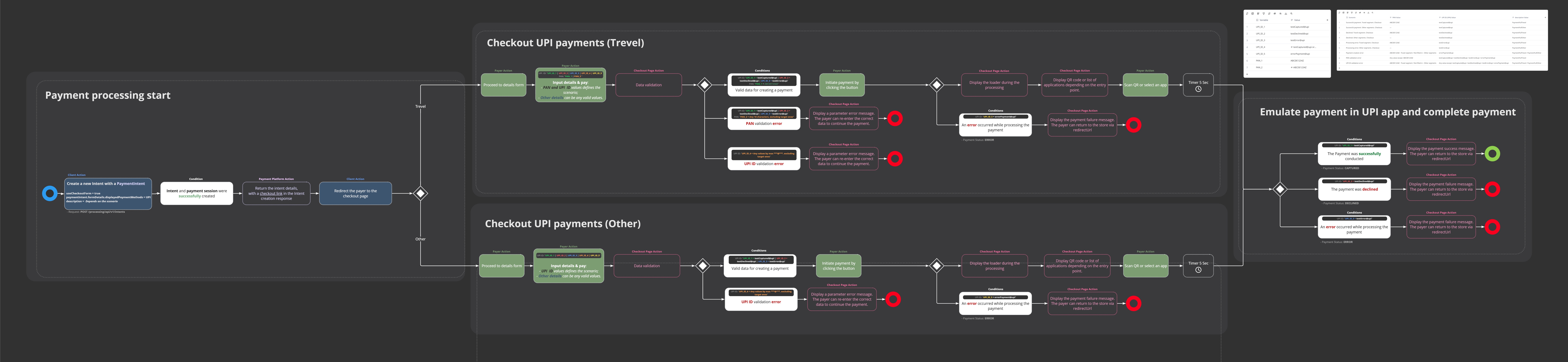
Download in high resolution
Step-by-Step Scenario Description
| Scenario | Steps |
|---|---|
| Successful payment. Travel segment |
|
| Successful payment. Other segments |
|
| Declined. Travel segment |
|
| Declined. Other segments |
|
| Processing error. Travel segment |
|
| Processing error. Other segments |
|
| Payment creation error |
|
| PAN validation error |
|
| UPI ID validation error |
|
Updated 3 months ago