
"DCB" Payment Method
Payment Method Definition
displayedPaymentMethodsIt is a parameter in the Intent creation request that defines which payment method should be displayed to the payer on the checkout form. It is an alternative to
paymentMethodNamein host-to-host integration.
This parameter is provided in:paymentIntent.formDetails.displayedPaymentMethods
For this method you need to provide theDCB_RUvalue.
DCB (Direct Carrier Billing) is a carrier-billed payment method. On the checkout form the payer enters their mobile phone number — the account the payment is charged to. There is no QR and no redirect to a bank app: the mobile operator sends the payer an SMS, the payer confirms the charge by replying to it, and the checkout form shows the result. We notify you of the final status via a webhook.
Payment Method Features
| Feature | Value |
|---|---|
| Country | Russia |
| Processing Currencies | RUB |
| Payments | Yes |
| -- Min per transaction amount | Vary, depends on your contract |
| -- Max per transaction amount | Vary, depends on your contract |
| Refunds | Yes (Full amount & MTS subscribers only) |
| Chargebacks | No |
Workflow
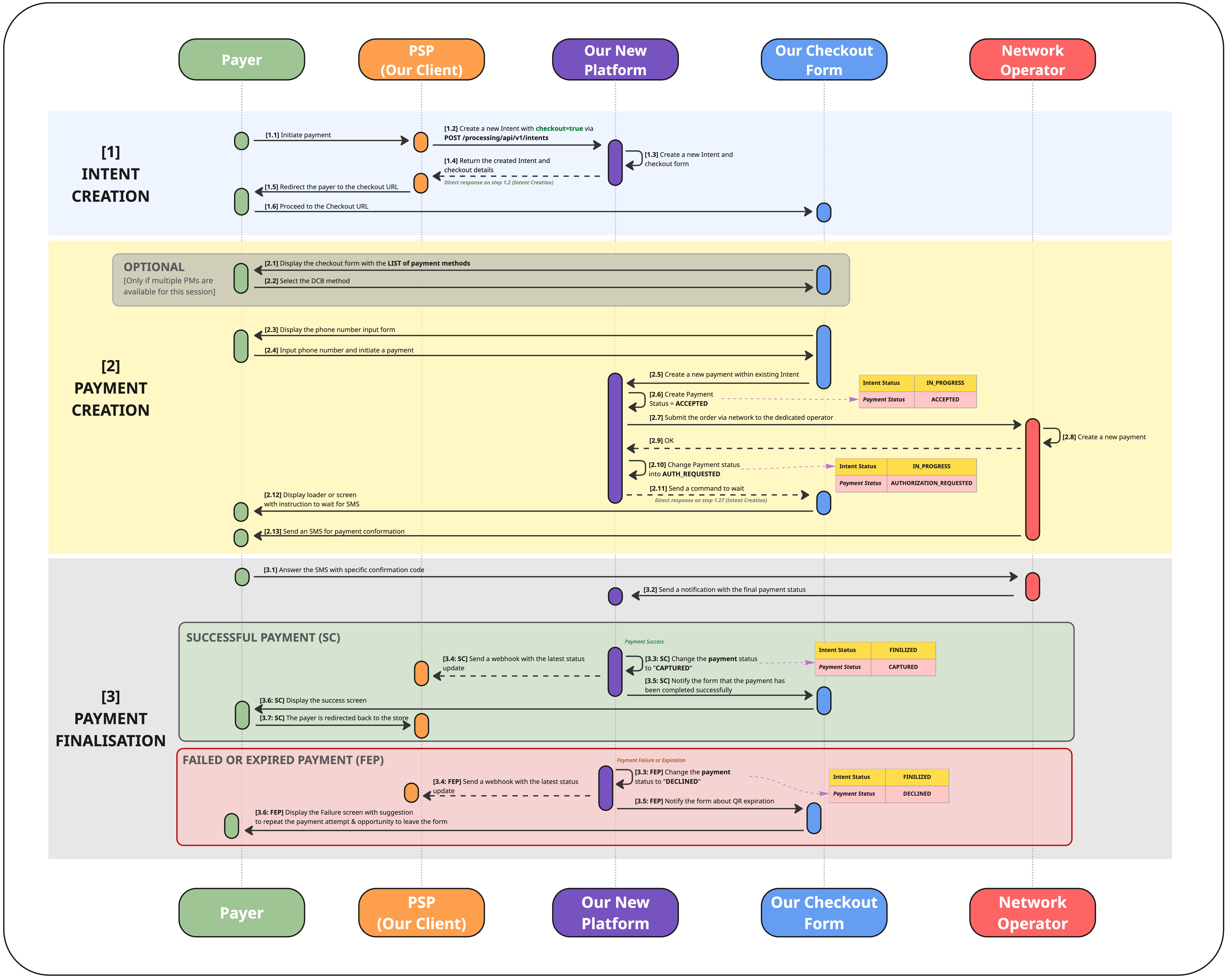
Download in high resolution
Checkout Flow
| Stage | What happens |
|---|---|
| Intent Creation | [1.1] The payer initiates a payment on your side. [1.2] You create an Intent with useCheckoutForm = true via POST /processing/api/v1/intents.[1.3–1.4] Our platform creates the Intent and the checkout session, and returns the checkout URL in the synchronous response (paymentIntent.additionalData.url).[1.5–1.6] You redirect the payer to the checkout URL. |
| Payment Creation | [2.1–2.2] The payer selects the DCB method (skipped automatically if it is the only method in the session). [2.3–2.4] The form displays the phone number input; the payer enters their number and confirms. [2.5–2.10] A Payment is created within the Intent and submitted to the payer's mobile network operator.[2.11–2.13] The form shows a waiting screen; the operator sends the payer an SMS. |
| Payment Finalisation | [3.1–3.2] The payer replies to the SMS; the operator returns the final result. [3.3–3.5] The payment becomes CAPTURED or DECLINED, the Intent is finalised, and a webhook is sent.[3.6–3.7] The form shows the success screen and redirects the payer back to the store, or shows the failure screen with an option to retry. |
Confirmation happens outside the checkout formThe payer confirms the charge by replying to an SMS from their mobile network operator, not on the form itself. Confirmation is expected within 30 minutes. The waiting screen stays on until the result arrives — the payer may background the browser to answer the SMS and return later.
Declines are not itemisedThe operator does not distinguish between a payment the payer refused, a payment that failed for lack of funds, and a payment that expired without a reply. All of them arrive as a single
DECLINEDstatus with no specific reason. After a decline the payer can retry within the same checkout session — a retry creates a newPaymentwithin the sameIntent.
Create Intent Request
Specifics
- We use one unified Intent creation request for all supported payment methods: POST /processing/api/v1/intents
- The overall structure is the same, but some fields change depending on the payment method and the way of integration: Host-to-Host or Hosted Checkout.
- For Host-to-Host we will expect you to complete the
Paymentobject- For Hosted Checkout we will expect you to complete the
PaymentIntentobject- You do not send the payer's phone number. The payer enters it on the checkout form — this is the key difference from the Host-to-Host integration of this method.
'Intent' vs 'Payment' vs 'PaymentIntent'
Some objects and parameters in this API may appear similar, but they represent different concepts and are used in different integration scenarios. The explanation below clarifies the purpose of each term.
| Term | Meaning |
|---|---|
| Intent |
|
| Payment |
|
| PaymentIntent |
|
Request/Response Description
Request Description
    {
      "clientReferenceId": "070826-1",
      "useCheckoutForm": true,
      "paymentIntent": {
        "formDetails": {
          "template": "string",
          "displayedPaymentMethods": ["DCB_RU"],
          "backToStoreRedirectUrl": "https://merchant.example.com/checkout"
        },
        "submittedAmount": {
          "value": 200.00,
          "currency": "RUB"
        },
        "description": "Order 070826-1",
        "webhookUrl": "https://merchant.example.com/webhooks/payments"
      }
    }
Top-Level Request Parameters
| Parameter | Type | Required | Description |
|---|---|---|---|
clientReferenceId | String | Required | Order number in the merchant system. |
useCheckoutForm | Boolean | Conditional | Optional in general. Must be set to true when using the Checkout Form integration. |
paymentIntent | Object | Conditional | Optional in general. Must be provided when using the Checkout Form integration. |
description | String | Optional | Order description. Displayed if paymentIntent.description is not provided. |
merchant | Object | Optional | Merchant information. Required if the store name must be displayed on the checkout form. |
paymentIntent
| Parameter | Type | Required | Description |
|---|---|---|---|
formDetails | Object | Optional | Checkout parameters |
submittedAmount | Object | Required | Order amount and currency. The currency is always RUB for this method. |
description | String | Optional | Order Description that can be displayed on the Checkout Form. |
webhookUrl | String | Required | URL to which we will send webhooks related to payments created within the Intent and their status changes |
formDetails
| Parameter | Type | Required | Description |
|---|---|---|---|
template | String | Optional | The name of the checkout template to be used. Multiple templates can be configured and selected for different use cases |
displayedPaymentMethods | Array of Strings | Optional | List of payment methods to be made available to the payer. If only one payment method is provided, no selection screen is shown and the payer is taken directly to the phone number form |
backToStoreRedirectUrl | String | Optional | URL to which the payer is redirected if they leave the Checkout Form or after payment completion. Must start with "https://". |
submittedAmount
| Parameter | Type | Required | Description |
|---|---|---|---|
value | Number | Required | Submitted order amount in major units (roubles), e.g. 200.00. |
currency | String | Required | Submitted order currency in ISO 4217 alpha-3 format. Always RUB for this method. |
merchant
| Parameter | Type | Required | Description |
|---|---|---|---|
name | String | Optional | The name of store, that might be displayed on the checkout form if configured |
website | String | Optional | The website of the store |
Response Description
    {
      "intentId": "344115072451633152",
      "useCheckoutForm": true,
      "paymentIntent": {
        "intentSessionId": "344115072812340000",
        "backToStoreRedirectUrl": "https://merchant.example.com/checkout",
        "displayedPaymentMethods": ["MOBILE_MONEY_RU"],
        "submittedAmount": {
          "value": 200.00,
          "currency": "RUB"
        },
        "description": "Order 070826-1",
        "webhookUrl": "https://merchant.example.com/webhooks/payments",
        "additionalData": {
          "url": "link to our Checkout Form",
          "expirationDateTime": "YYYY-MM-DDTHH:mm:ssZ"
        }
      },
      "clientReferenceIntentId": "070826-1",
      "intentStatus": "CREATED"
    }
Top-Level Response Parameters
| Parameter | Type | Required | Description |
|---|---|---|---|
intentId | String | Required | Unique identifier of the Intent in our platform. |
useCheckoutForm | Boolean | Required | H2H: false or empty.Checkout: true. |
paymentIntent | Object | Conditional | Optional in general. Required when using the Checkout Form integration. |
clientReferenceIntentId | String | Required | Order number in the merchant system. Returned from the request. |
merchant | Object | Optional | Merchant information. Returned from the request. |
processingStatusCode | String | Required | Processing status code. May indicate success or an error. |
statusMessage | String | Optional | Status message. Returned when an error occurs. |
description | String | Optional | Intent description. Returned from the request. |
intentStatus | String | Required | Current Intent status. See the dedicated section of this API guide for possible values and the status model. |
paymentIntent
Note: in the response, the `paymentIntent` object is **flattened** compared to the request — checkout form fields (`backToStoreRedirectUrl`, `displayedPaymentMethods`) are returned directly on `paymentIntent`, not inside a nested `formDetails` object. The `template` field from the request is not echoed back in the response.
| Parameter | Type | Required | Description |
|---|---|---|---|
intentSessionId | String | Optional | Our internal id of the session associated with the created Payment Intent. |
backToStoreRedirectUrl | String | Required | URL to which the payer is redirected if they leave the Checkout Form or after payment completion (returned from the request). |
displayedPaymentMethods | Array of Strings | Optional | List of payment methods made available to the payer on the Checkout Form (returned from the request). |
submittedAmount | Object | Required | Order amount and currency (returned from the request). |
description | String | Optional | Order Description (returned from the request). |
webhookUrl | String | Optional | Webhook URL to which we will send webhooks related to payments created within the Intent and their status changes (returned from the request). |
additionalData | Object | Required | An object containing important fields related to the checkout (e.g. checkout URL, session expiration). |
additionalData
| Parameter | Type | Required | Description |
|---|---|---|---|
url | String | Required | Checkout form URL to which the payer must be redirected to complete the payment. |
expirationDateTime | String | Optional | Date and time when the Intent session expires, in format YYYY-MM-DDTHH:mm:ssZ.Until that time, the payer can access the checkout form and attempt the payment. Multiple payment attempts may be made during the session lifetime. If the session expires without a successful payment, a new Intent must be created. |
Webhooks
- After the checkout form is created, the payer can make multiple payment attempts during the payment session lifetime.
- By default, the session remains active for 20 minutes, although this value can be changed by your integration manager.
- The platform sends webhooks to the URL provided in
paymentIntent.webhookUrlfrom the request whenever the status of a payment changes.
For more information about payment webhooks, see the dedicated page
A payment can complete after the session expiresThe checkout session lifetime limits how long the form is accessible — it does not cancel a payment that is already waiting for SMS confirmation. A payment in progress resolves within the operator's own window (up to 30 minutes) and its final webhook (
CAPTUREDorDECLINED) is delivered even if the session has already expired. Rely on webhooks, not on the session deadline, to settle the order.
Updated 21 days ago