
"SBP" Payment Method
Accept SBP payments in RUB through Hosted Checkout. Create an Intent, redirect the payer to the returned checkout URL, and receive payment updates by webhook.
Payment Method Definition
displayedPaymentMethodsThis parameter defines which payment methods are available to the payer on the checkout form.
Provide it in
paymentIntent.formDetails.displayedPaymentMethods.For SBP, use
["SBP"].
Payment Method Features
| Feature | Value |
|---|---|
| Country | Russia |
| Processing Currency | RUB |
| Payments | Yes |
| Payment Options | QR code and payment link |
| Refunds | Full and partial, through the Refund API |
| Disbursements | Available through a separate API flow |
SBP must be enabled for your settlement account before you can offer it on the checkout form.
Workflow
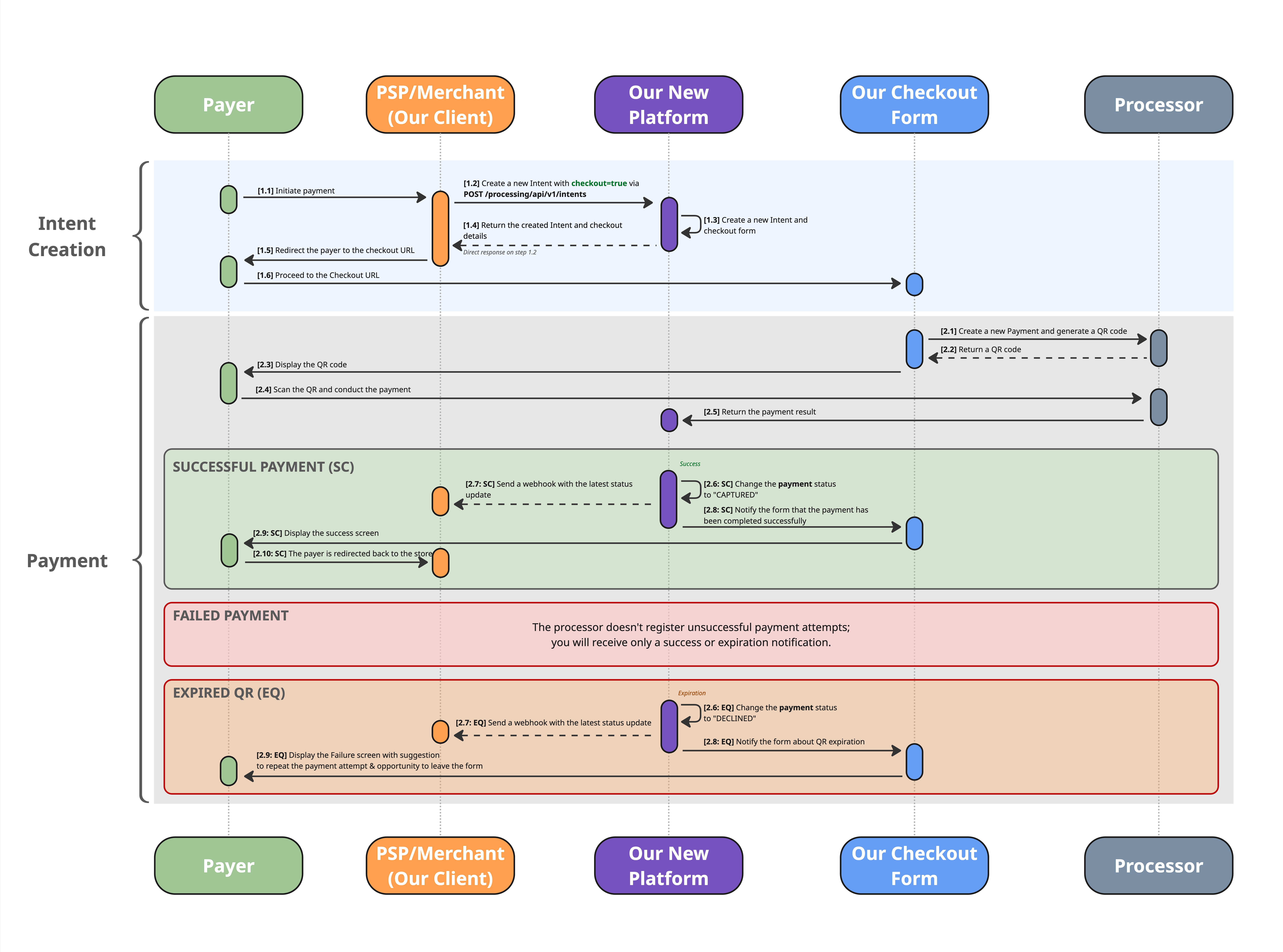
Download in high resolution
- Create an Intent with
useCheckoutFormset totrueand["SBP"]inpaymentIntent.formDetails.displayedPaymentMethods. - Redirect the payer to the URL returned in
paymentIntent.additionalData.url. - The checkout form opens the SBP payment option and prepares a QR code.
- The payer scans the QR code or follows the payment link, then confirms the payment in their banking app.
- The checkout form displays the payment result. The platform sends payment updates to your webhook URL, if configured.
| Device | Payment Experience |
|---|---|
| Desktop | The payer scans the QR code with their phone. A payment link can also be displayed if enabled in the checkout template. |
| Mobile | The payer can follow the payment link using the button below the QR code. |
The checkout form prepares and displays the QR code. You do not need to request or display a separate SBP payment link.
Create Intent Request
Specifics
- Use POST /processing/api/v1/intents.
- Set
useCheckoutFormtotrueand provide thepaymentIntentobject.- Include
formDetails, the order amount in RUB, and an order description.- Select SBP using
paymentIntent.formDetails.displayedPaymentMethods.- The checkout form handles the payment attempt when the payer opens the SBP option. You do not need to provide a
paymentsarray or SBP payment instrument details in this request.
Intent, Payment, and PaymentIntent
| Term | Meaning |
|---|---|
| Intent | The order container that groups the checkout session and its payment attempts. |
| Payment | An individual payment attempt. For SBP Hosted Checkout, it is created when the checkout form prepares the SBP payment. |
| PaymentIntent | The order details and checkout settings supplied when creating the Intent. These settings apply to payments made within the session. |
Creating the Intent does not mean the order has been paid. Confirm the payment result using payment status updates.
Request and Response Description
Request Description
The example below creates an SBP checkout session for an order of 500 RUB. Replace the order reference, description, amount, and merchant URLs with your own values. Send the request with your Authorization and settlement-account-id headers, as described in the API reference.
{
  "clientReferenceId": "1234",
  "useCheckoutForm": true,
  "paymentIntent": {
    "formDetails": {
      "displayedPaymentMethods": ["SBP"],
      "backToStoreRedirectUrl": "https://merchant.com/checkout"
    },
    "submittedAmount": {
      "value": 500.00,
      "currency": "RUB"
    },
    "description": "Order #1234",
    "webhookUrl": "https://merchant.com/webhook"
  }
}
Top-Level Request Parameters
| Parameter | Type | Required | Description |
|---|---|---|---|
clientReferenceId | String | Required | Order reference in your system. |
useCheckoutForm | Boolean | Required for Hosted Checkout | Set to true. |
paymentIntent | Object | Required for Hosted Checkout | Order details and checkout settings. |
description | String | Optional | Intent description. For Hosted Checkout, paymentIntent.description is used as the Intent description. |
merchant | Object | Optional | Merchant information. |
paymentIntent
| Parameter | Type | Required | Description |
|---|---|---|---|
formDetails | Object | Required | Hosted Checkout settings. |
submittedAmount | Object | Required for this flow | Order amount and currency. This page describes an SBP payment submitted in RUB. |
description | String | Required | Order description displayed on the checkout form and used for the payment. Maximum length: 10,000 characters. |
webhookUrl | String | Optional | URL for payment status notifications. If omitted, the default webhook URL configured for your settlement account is used. If neither URL is configured, payment webhooks are not sent. |
formDetails
| Parameter | Type | Required | Description |
|---|---|---|---|
template | String | Optional | Name of a configured checkout template. If omitted, the default template is used. |
displayedPaymentMethods | Array of Strings | Optional | Use ["SBP"] to offer only SBP. The SBP option opens automatically. If omitted, the form offers the available checkout payment methods for your settlement account. |
backToStoreRedirectUrl | String | Optional | Destination for the checkout form's Back to store button. The button is shown when a URL is provided and the checkout template enables it. |
submittedAmount
| Parameter | Type | Required | Description |
|---|---|---|---|
value | Number | Required for this flow | Order amount in RUB, for example 500.00 for 500 rubles. Must be greater than zero. |
currency | String | Required for this flow | Use RUB for the flow described on this page. |
merchant
| Parameter | Type | Required | Description |
|---|---|---|---|
name | String | Optional | Merchant name. |
website | String | Optional | Merchant website. |
Response Description
The example below shows the checkout fields in a successful creation response. Generated identifiers, the checkout URL, and the expiry timestamp are shown as placeholders; use the values returned by the API.
{
  "intentId": "<intentId>",
  "clientReferenceIntentId": "1234",
  "description": "Order #1234",
  "intentStatus": "CREATED",
  "paymentIntent": {
    "intentSessionId": "<intentSessionId>",
    "backToStoreRedirectUrl": "https://merchant.com/checkout",
    "displayedPaymentMethods": ["SBP"],
    "submittedAmount": {
      "value": 500.00,
      "currency": "RUB"
    },
    "description": "Order #1234",
    "webhookUrl": "https://merchant.com/webhook",
    "additionalData": {
      "url": "<checkoutUrl>",
      "expirationDateTime": "<YYYY-MM-DDTHH:mm:ssZ>"
    }
  },
  "checkoutForm": true
}The request uses
useCheckoutForm; the response returnscheckoutForm.In the response,
backToStoreRedirectUrlanddisplayedPaymentMethodsappear directly insidepaymentIntent. The response does not contain a nestedformDetailsobject or echo the template name.
Top-Level Response Parameters
| Parameter | Type | Description |
|---|---|---|
intentId | String | Identifier of the created Intent. |
clientReferenceIntentId | String | Order reference supplied as clientReferenceId in the request. |
description | String | Description supplied in paymentIntent.description. |
intentStatus | String | Current Intent status. For a newly created SBP checkout Intent, the initial status is CREATED. |
paymentIntent | Object | Checkout session details. |
checkoutForm | Boolean | true for an Intent with a checkout session. |
processingStatusCode | String | May be returned to identify a processing error. |
statusMessage | String | May be returned with additional status information. |
paymentIntent
| Parameter | Type | Description |
|---|---|---|
intentSessionId | String | Identifier of the checkout session. |
backToStoreRedirectUrl | String | Return URL supplied in the request. If no URL was supplied, this field may contain the value redirect; this value is not a merchant URL. |
displayedPaymentMethods | Array of Strings | Payment methods available in this checkout session. Contains ["SBP"] when only SBP was requested. |
submittedAmount | Object | Order amount and currency. |
description | String | Order description supplied in the request. |
webhookUrl | String | Returned when supplied in the request. A default webhook URL configured for the settlement account is not echoed in this field. |
additionalData | Object | Checkout URL and session expiry. |
submittedAmount
| Parameter | Type | Description |
|---|---|---|
value | Number | Submitted order amount. |
currency | String | Submitted order currency. For the request shown above, RUB. |
additionalData
| Parameter | Type | Description |
|---|---|---|
url | String | Hosted Checkout URL. Redirect the payer to this URL to make the payment. |
expirationDateTime | String | Checkout session expiry in UTC, in the format YYYY-MM-DDTHH:mm:ssZ. |
Session Lifetime
The default checkout session lifetime is 20 minutes and can be changed in the checkout template. Use paymentIntent.additionalData.expirationDateTime from the response to determine when the session expires.
The payer may retry an unsuccessful payment while the session allows another attempt and has not expired. If the session expires without a successful payment, create a new Intent to offer a new checkout session.
An SBP QR code can have a separate expiry. The checkout session expiry does not guarantee that a particular QR code remains valid until the same time.
Webhooks
Payment status notifications are sent to
paymentIntent.webhookUrl, or to the default webhook URL configured for your settlement account if the request does not provide one.Notifications relate to individual payment attempts within the Intent. Use them to confirm the payment result. Opening the checkout form or returning to the store does not confirm a successful payment.
For webhook formats and delivery details, see Webhooks Overview.
Updated about 2 hours ago