
"ByBit" Payment Method
Payment Method Definition
displayedPaymentMethodsSet
paymentIntent.formDetails.displayedPaymentMethodsto["BYBIT_PAY"]to offer Bybit Pay on the Carusell Hosted Checkout form. Bybit Pay must be enabled for Hosted Checkout on your settlement account.When Bybit Pay is the only available method in the session, the payer proceeds directly to its payment flow. If multiple methods are available, the payer can choose a method on the form.
Use the exact Checkout method code
BYBIT_PAYin this array.
Payment Method Features
| Feature | Description |
|---|---|
| Payment method | Bybit Pay |
| Integration | Hosted Checkout |
| Checkout method code | BYBIT_PAY |
| Payments | QR payment confirmed by the payer in Bybit. |
| Refunds | Refunds of successfully captured payments through the platform Refund API. |
| Payment confirmation | Platform payment status received through a webhook or retrieved through the API. |
| Currencies and limits | Use the currencies and transaction limits enabled for your integration. |
Workflow
- Create an Intent with
useCheckoutForm: trueand includeBYBIT_PAYinpaymentIntent.formDetails.displayedPaymentMethods. - Receive the Hosted Checkout URL in
paymentIntent.additionalData.urland redirect the payer to it. - The checkout form starts a Bybit Pay payment within the Intent. The platform creates the Bybit order and the form displays its QR code.
- The payer scans the QR with Bybit, reviews the transaction details, and confirms the payment.
- The platform updates the payment status and sends a webhook to the configured URL. The checkout form displays the result.
- Fulfil the order only when the platform payment status is
CAPTURED.
The initial Intent response provides access to the Hosted Checkout session. The payment and its QR are created later, within the checkout flow.
Redirect the payer to the exact value of
paymentIntent.additionalData.url. The checkout form displays the QR and handles the payment screen.
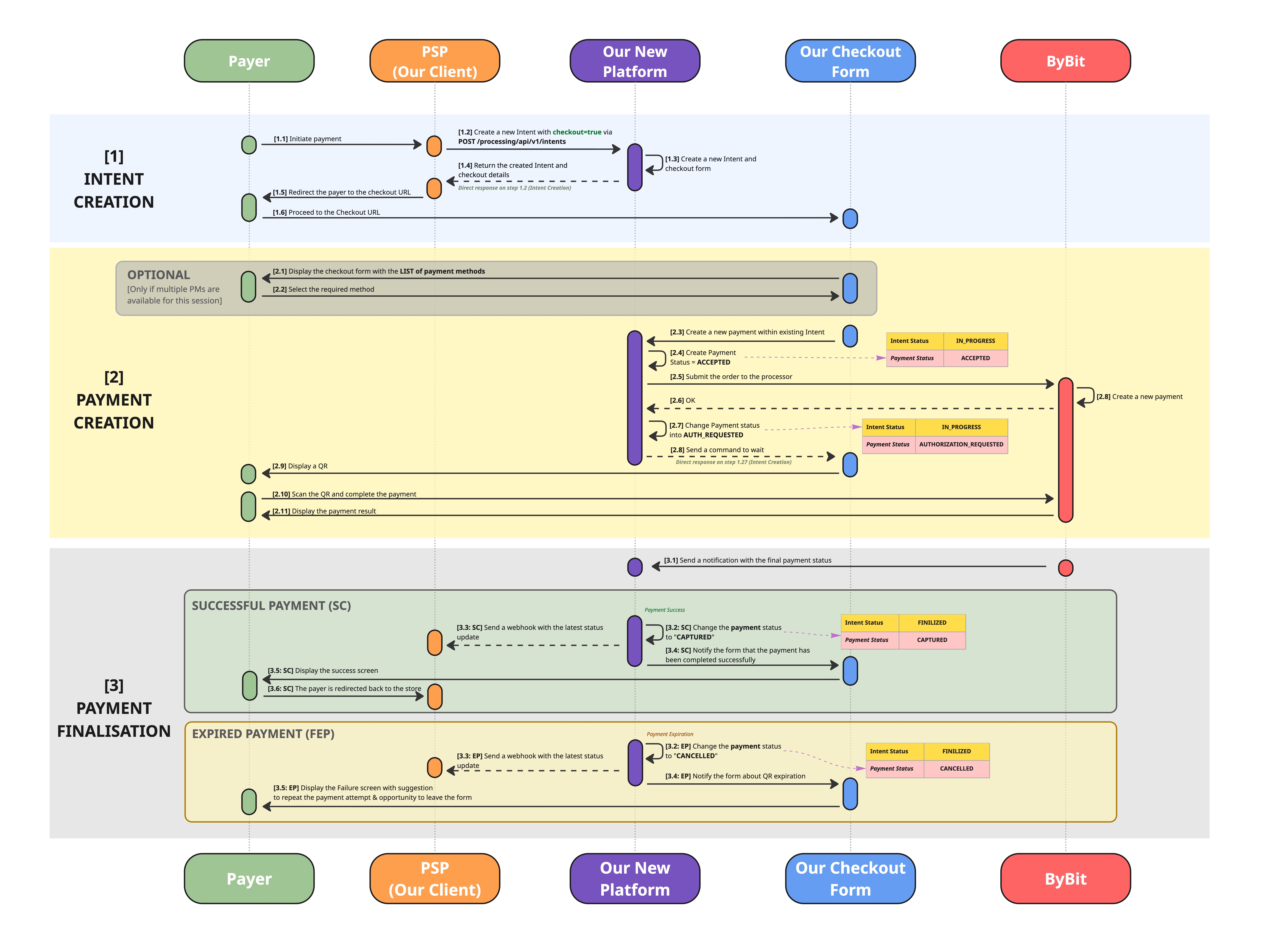
The diagram shows the successful and expired-payment paths. Other unsuccessful outcomes are described under Payment Statuses.
Create Intent Request
Request specifics
- Endpoint: POST /processing/api/v1/intents.
- Set
useCheckoutFormtotrue.- Provide order details and checkout configuration in
paymentIntent.- Include
BYBIT_PAYinpaymentIntent.formDetails.displayedPaymentMethods.- For this flow, omit the H2H
paymentsarray and itspaymentInstrument.incomingDetails. The checkout form handles the creation of the payment.- Use
paymentIntent.formDetails.backToStoreRedirectUrlfor the payer's return destination.- Configure payment notifications through
paymentIntent.webhookUrlor the settlement account's default webhook URL.
Use the standard platform authentication and settlement-account-id header described in the API reference. The examples below show JSON request and response bodies.
Intent, Payment, and PaymentIntent
| Term | Meaning |
|---|---|
| Intent | The top-level container for the order and its transactions. Use its ID to correlate the overall checkout flow. |
| PaymentIntent | The order details and Hosted Checkout configuration supplied when creating the Intent. It creates a checkout session. |
| Payment | An individual payment attempt. Hosted Checkout creates it within the existing Intent when the payer starts the payment flow. Each attempt has its own payment ID and status. |
Request/Response Description
Request Template
Replace CURRENCY_CODE with a currency enabled for your integration. The amount is illustrative; use the precision and limits agreed for that currency.
{
  "clientReferenceId": "order-bybit-checkout-1001",
  "useCheckoutForm": true,
  "paymentIntent": {
    "formDetails": {
      "displayedPaymentMethods": ["BYBIT_PAY"],
      "backToStoreRedirectUrl": "https://merchant.example.com/orders/order-bybit-checkout-1001"
    },
    "submittedAmount": {
      "value": 100.50,
      "currency": "CURRENCY_CODE"
    },
    "description": "Order bybit-checkout-1001",
    "webhookUrl": "https://merchant.example.com/webhooks/payments"
  }
}
Top-Level Request Parameters
| Parameter | Type | Required | Description |
|---|---|---|---|
clientReferenceId | String | Required | Your reference for this Intent, unique within the same admin account and settlement account. Use a new reference for each new Intent, including a new checkout session for an existing order. Store it together with the returned platform intentId. |
useCheckoutForm | Boolean | Required for this flow | Set to true to create a Hosted Checkout session. |
paymentIntent | Object | Required for this flow | Order details and checkout configuration. |
paymentIntent
| Parameter | Type | Required | Description |
|---|---|---|---|
formDetails | Object | Required | Configuration for Carusell Hosted Checkout. |
submittedAmount | Object | Required for the illustrated flow | Order amount and currency. |
authorizationAmount | Object | Optional | Explicit authorisation amount and currency. Use only when this is part of an agreed integration flow. |
description | String | Required | Order title or payment reason. Maximum 10,000 characters. |
webhookUrl | String | Optional | URL for payment status notifications. Overrides the settlement account's default webhook URL for payments created within this session. If omitted, the account default is used. Configure either URL to receive notifications. |
formDetails
| Parameter | Type | Required | Description |
|---|---|---|---|
template | String | Optional | Checkout template configured for the settlement account. If omitted, the default template is used. |
displayedPaymentMethods | Array of Strings | Required for the illustrated flow | Set to ["BYBIT_PAY"] for a Bybit-only session. Additional enabled methods may be included. If omitted, the platform uses the methods available for Hosted Checkout under the account configuration. |
backToStoreRedirectUrl | String | Optional | Your return-to-store URL. Return controls and redirects depend on the checkout template. Provide this field to define the payer's return destination. |
submittedAmount
| Parameter | Type | Required | Description |
|---|---|---|---|
value | Number | Required | Submitted order amount as a JSON number, for example 100.50. |
currency | String | Required | Currency code enabled for your integration. |
authorizationAmount — when used
| Parameter | Type | Required | Description |
|---|---|---|---|
value | Number | Required when the object is supplied | Explicit authorisation amount as a JSON number. |
currency | String | Required when the object is supplied | Authorisation currency enabled for the agreed flow. |
The tables describe the fields relevant to this flow. See the Create Intent reference for the complete shared request schema.
Response Example
Fields relevant to this flow are shown. Identifiers, URLs, amount, currency, and expiry are illustrative. Always use the checkout URL and expiration returned by the API.
{
  "intentId": "344115072451633152",
  "checkoutForm": true,
  "paymentIntent": {
    "intentSessionId": "344115072480993280",
    "backToStoreRedirectUrl": "https://merchant.example.com/orders/order-bybit-checkout-1001",
    "displayedPaymentMethods": ["BYBIT_PAY"],
    "submittedAmount": {
      "value": 100.50,
      "currency": "CURRENCY_CODE"
    },
    "description": "Order bybit-checkout-1001",
    "webhookUrl": "https://merchant.example.com/webhooks/payments",
    "additionalData": {
      "url": "https://checkout.example.com/session/344115072480993280",
      "expirationDateTime": "2026-09-18T15:30:00Z"
    }
  },
  "clientReferenceIntentId": "order-bybit-checkout-1001",
  "description": "Order bybit-checkout-1001",
  "intentStatus": "CREATED"
}In the response,
backToStoreRedirectUrlanddisplayedPaymentMethodsare directly underpaymentIntent. The request'sformDetailswrapper andtemplatefield are not echoed.A successful response confirms creation of the Intent and checkout session. Use payment status updates to determine the outcome of the payment created later by Checkout.
Top-Level Response Parameters
| Parameter | Type | Description |
|---|---|---|
intentId | String | Platform Intent identifier. Save it to correlate payment attempts within this checkout flow. |
checkoutForm | Boolean | true when the response includes a checkout session. |
paymentIntent | Object | Created checkout session and order details. |
clientReferenceIntentId | String | Your clientReferenceId from the request. |
description | String | Intent description. For this Checkout flow, populated from paymentIntent.description. |
intentStatus | String | Current Intent status. A newly created checkout Intent starts in CREATED. |
processingStatusCode | String | Processing error code, when returned. |
statusMessage | String | Processing error description, when returned. |
paymentIntent
| Parameter | Type | Description |
|---|---|---|
intentSessionId | String | Identifier of the checkout session. |
backToStoreRedirectUrl | String | Return destination associated with the session. Supply it explicitly in the request to define your store URL. |
displayedPaymentMethods | Array of Strings | Methods available in the checkout session. For the illustrated flow: ["BYBIT_PAY"]. |
submittedAmount | Object | Submitted order amount and currency. |
description | String | Order description supplied in paymentIntent.description. |
webhookUrl | String | Session-specific webhook URL, when supplied. May be omitted when notifications use the settlement account default. |
additionalData | Object | Hosted Checkout access information. |
payer | Object | Payer details, when present. |
payee | Object | Payee details, when applicable. |
submittedAmount
| Parameter | Type | Description |
|---|---|---|
value | Number | Submitted order amount. |
currency | String | Submitted currency. |
additionalData
| Parameter | Type | Description |
|---|---|---|
url | String | Hosted Checkout URL. Redirect the payer to this exact URL. |
expirationDateTime | String (date-time) | Checkout session expiration in ISO 8601 format, for example 2026-09-18T15:30:00Z. The lifetime depends on the checkout configuration. |
Bybit Pay Checkout Experience
The Hosted Checkout form creates the Bybit payment and displays the QR. The payer scans it with Bybit and confirms the transaction there.
After the platform records the result, the checkout form displays a success or failure screen. The payer can return to your store using the destination configured in paymentIntent.formDetails.backToStoreRedirectUrl, subject to the checkout template's behaviour.
If a payment expires, the form displays the failed attempt and offers the next actions available for that session. A retry creates a new payment attempt when the checkout session permits it.
Confirm the order using the platform payment status. A browser redirect to your store is part of the payer experience and does not confirm that funds were captured.
Payment Statuses
| Status | Meaning | Merchant action |
|---|---|---|
ACCEPTED | The platform has created the payment and accepted it for processing. | Wait for further updates. |
AUTHORIZATION_REQUESTED | The Bybit payment has been created and is waiting for the payer to complete it. | Wait for the result. |
CAPTURED | The payment completed successfully. | Fulfil the order once. |
DECLINED | The payment was rejected. | Keep the order unpaid for this attempt. In a webhook, use declineCode and declineMessage, when present, for diagnostics. |
CANCELLED | The payment was cancelled or the QR expired before completion. | Keep the order unpaid for this attempt. A new attempt may be available within the active checkout session. |
ERROR | A processing error prevented completion. | In a webhook, inspect errorCode and errorMessage, when present. Reconcile the payment state before retrying. |
Checkout session and payment lifetimes are separate.
paymentIntent.additionalData.expirationDateTimedescribes the checkout session. A payment created within it has its own status and QR expiration.
intentStatusdescribes the containing Intent. An Intent can reachFINALIZEDafter a successful or unsuccessful payment attempt. Use the individual payment'sstatusto determine whether the order was paid.
Retrieve Payment Status
If a webhook is delayed or missed, use the saved intentId to recover the payment attempts created by Checkout:
- Call GET /processing/api/v1/intents/{id} with the
intentIdreturned when you created Checkout. - Inspect
payments[]. Each payment has its ownidandstatus. Save these IDs and evaluate each attempt separately. - To retrieve an individual payment, call GET /processing/api/v1/payments/{id} with that payment's ID. If you already received
transactionIdin a payment webhook, you can use it directly for this call.
Before Checkout creates a payment, the Intent may contain no payment attempts. An empty list does not establish a payment outcome. If multiple attempts exist, use each attempt's status; a failed attempt does not override a separate successful payment for the order.
Diagnostic field names depend on the response:
- Payment webhook:
declineCode/declineMessagefor a decline;errorCode/errorMessagefor a processing error.- Get Payment:
declineCode/declineCodeMessagefor a decline;errorCodefor a processing error. AnerrorMessagefield is not part of this response.- Get Intent, inside
payments[]:declineCode/declineCodeMessage, andprocessingStatusCode/statusMessagewhen returned.
Refunds
Bybit Pay payments completed through Hosted Checkout use the platform's standard refund flow.
- Request a refund only after the original payment reaches
CAPTURED. - Use the platform payment ID:
transactionIdin a payment webhook (transactionType: "PAYMENT"),payments[].idin the Get Intent response, oridin the Get Payment response. - Submit POST /processing/api/v1/refunds with that value in
paymentId. The refund request expects an int64 JSON integer; preserve the exact identifier when converting the response string. - For a full refund, omit
paymentSubmittedAmountandpaymentAuthAmount, and omitpartialor set it tofalse. This requests the original payment amounts and must pass the available-amount checks, including any earlier refunds. - Refund processing is asynchronous. A successful creation response accepts the request for processing; treat the refund as completed only when its status is
REFUNDED. - Configure the refund's
webhookUrlor the settlement account default for refund status updates. The refund does not inherit the payment's request-specific webhook URL. - Retrieve the current refund state through GET /processing/api/v1/refunds/{id} if needed.
Webhooks
Payment status notifications use paymentIntent.webhookUrl when supplied, otherwise the settlement account's default webhook URL. Configure one of these destinations to receive notifications.
| Field | How to use it |
|---|---|
transactionType | Use PAYMENT notifications for payment outcomes and REFUND notifications for refund outcomes. |
transactionId | Platform identifier of the individual transaction. Track each payment attempt or refund separately. |
intentId | Correlates payment attempts with the Intent returned when you created Checkout. |
status | Current transaction status. Payment success is CAPTURED; refund success is REFUNDED. |
- Status notifications can include intermediate states. Fulfil the order only after confirming
CAPTURED. - Process duplicate notifications idempotently so that repeated delivery cannot fulfil the same order twice.
- Correlate each attempt by its payment ID and the overall order by its Intent ID. A failed attempt does not override a separate successful payment for the order.
- If a notification is delayed or missed, retrieve the Intent by its saved ID and inspect
payments[]. Once the payment ID is known, you can retrieve that payment directly. See Retrieve Payment Status above.
See Webhooks: Overview and Webhooks: Example for the shared notification contract.
Updated about 2 months ago